Smart Cable Management and Avoiding Costly Mistakes in Home Networking

TL;DR
When home Wi-Fi falls short, many resort to running Ethernet cables through challenging spaces. Poor planning can lead to regrettable DIY home improvement mistakes, from unexpected electrical hazards to awkward room layout design issues. Understanding the fundamentals of cable management in home design, electrical layout pitfalls, and workable alternatives helps you achieve a clean, safe, and future-ready network—without creating more problems than you solve.
Why Cable Management Deserves a Second Look

Thoughtful cable management blends technology into home design, preventing regrets and supporting safe, organized network upgrades.
Modern homes are built for style, but rarely with IT in mind. Many homeowners, stymied by weak Wi-Fi signals and thick walls, consider running network cables as a do-it-yourself solution. However, it only takes one misstep for a simple project to introduce lasting regrets: punctured electrical wires, unsightly holes in beautiful finishes, or a layout that complicates future renovations and daily life. As homes integrate more smart technology, thoughtful cable routing and management become foundational to both safety and design. Making informed choices now can save time, money, and frustration down the road.
-
The Complicated Landscape of Home Network Upgrades

Navigating home network upgrades means balancing connectivity with smart cable placement to preserve flexible, practical living spaces.
Few things feel as satisfying as streaming flawlessly in the farthest corner of your home. But achieving this seamless connectivity often means running physical cables when Wi-Fi extenders and mesh systems fall short due to challenging architecture or dense construction materials. In homes with flat roofs, minimal attic space, or extensive glass, the odds of finding a direct, hidden path dwindle. These challenges may tempt homeowners to take risky shortcuts—like drilling through exterior walls without adequate planning. The urge to fix a connectivity dead zone is understandable, but impulsive action often leads to "awkward room layout design challenges" down the line. Poorly placed cables may obstruct future furniture arrangements, create tripping hazards, or render parts of a room impractical for other uses. Worse, many overlook the importance of preparing the drill site, resulting in accidental breaches of electrical wiring or plumbing. Cable management in home design isn't simply about performance; it's about balancing immediate needs with long-term livability.
Expert Insight
One family living in a modern glass-heavy home quickly discovered that placing an Ethernet cable was anything but simple. The initial plan—to drill through exterior stucco—seemed straightforward, but after a hurried job, they were left with a blown-out repair and a cable that crisscrossed the living room. Regret set in as future upgrades and design tweaks were forever shaped by that hasty decision.
-
Mistakes Homeowners Regret: Learning from DIY Cable Runs
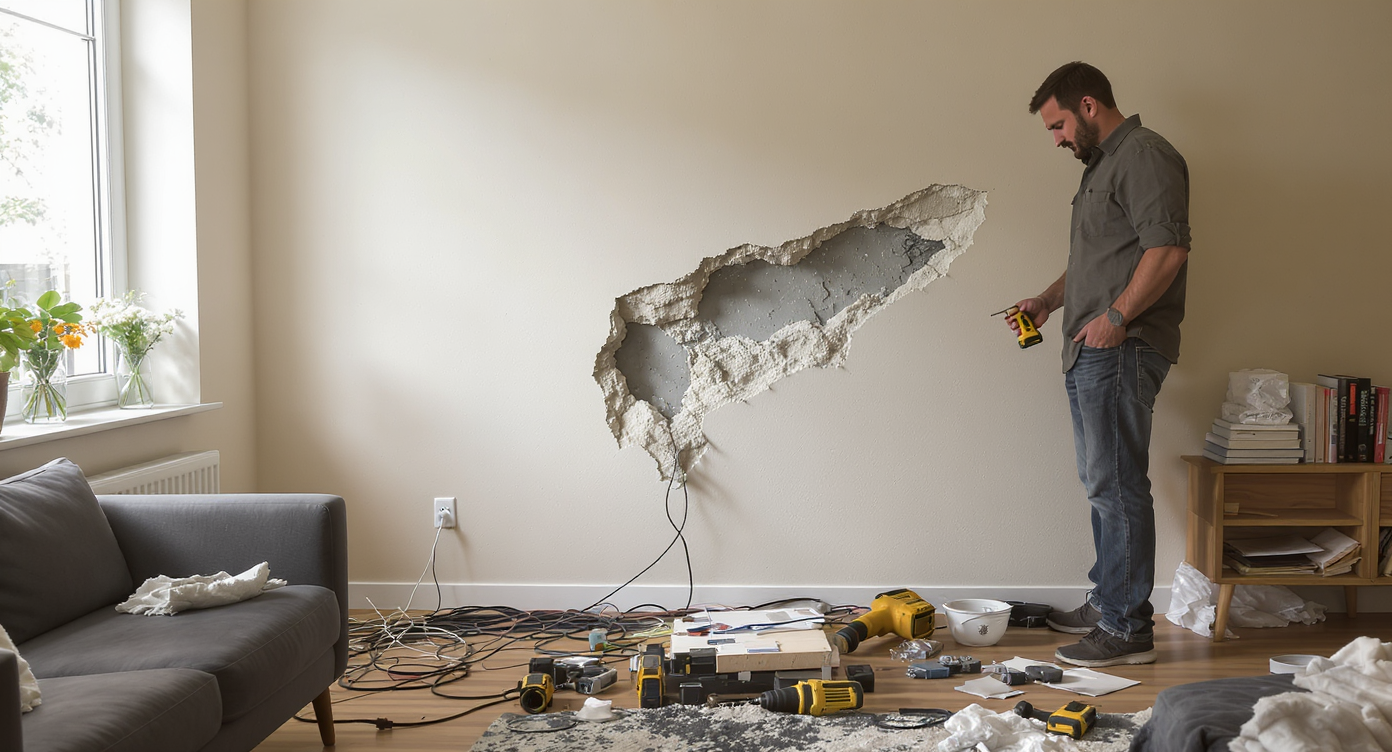
DIY cable mistakes, from crumbling wall holes to tangled wires, highlight why thoughtful planning is crucial for home networking success.
Diving into a DIY project with enthusiasm is admirable, but as many have discovered, certain mistakes can be difficult or even dangerous to correct. One of the most common regrets is failing to locate and avoid electrical wires or hidden obstacles before drilling. Some modern stud finders offer functionality that detects live wires, providing peace of mind when choosing a drilling site—yet homeowners still skip this essential step far too often. Overlooking the type of wall material creates further issues; drilling through stucco veneer, for example, requires care and the proper bits to avoid crumbling or 'blowout' holes on the opposite side. According to interior design professionals, insufficient planning at this stage can cascade into other problems. Exterior cables that aren't UV-rated will degrade, risking signal loss and necessitating replacement. Rushed cable runs across floors or windows can quickly become visual eyesores and a nightmare to patch during future updates. These are classic examples of "diy home improvement mistakes homeowners regret"—errors that linger both visually and functionally, impacting resale and daily satisfaction.
-
Better Alternatives: Thoughtful Planning for Long-Term Success

Thoughtful planning in cable management preserves home aesthetics and flexibility—key to a smart, future-ready network installation.
Before putting drill to wall, pause to reconsider all available options. Sometimes, creative solutions—like using existing conduit, baseboard channels, or even leveraging HVAC paths (with the right plenum-rated cable)—offer a route that preserves your architecture and minimizes risk. Powerline networking and MoCA adapters, which use your home’s electrical or coaxial wiring, are popular alternatives. While these aren't always feasible in homes with complex electrical layouts, they can rock a tricky space if the breakers or circuits cooperate. When physical cable runs are unavoidable, place cable chases and junctions in locations that won’t interfere with future design plans. Use cable rated for exterior use to guard against weathering and seal all exterior penetrations with appropriate silicone to prevent moisture intrusion. These details, though easily skipped in a "quick fix" mindset, prove invaluable for long-lasting performance and a polished look. Smart home projects also benefit from renovation best practices, such as precise scheduling and clear task sequencing in home renovation timelines.
-
Anecdote: When Enthusiasm Leads to Extra Repairs
One homeowner, eager to improve living room connectivity, bypassed a careful scan for electrical wires before drilling through stucco veneer. While the operation was technically successful, the drill punched an unintentionally wide hole right through the outer finish—a permanent blemish in an otherwise pristine space. Later attempts to touch up the area with patches and paint only highlighted the flaw, serving as a regular reminder that what seems like a five-minute job can easily become a recurring headache if not handled properly.
-
Common Mistakes to Avoid
Among the most frequent errors in cable management for home networking, skipping basic detection for live electrical wiring reigns supreme. Even homeowners wary of electrical layout mistakes sometimes underestimate the risk of striking water pipes, gas lines, or other mechanical runs that may snake unpredictably through older or unusually designed homes. Another familiar pitfall is neglecting the route’s future impact—routing cables across a floor plan without accounting for traffic flow, potential door swings, or evolving needs. Choosing the wrong type of cable for exterior or exposed runs can lead to premature failure. Using non-UV-rated cable outdoors, or failing to secure cable flush against the siding, shortens lifespan and detracts from curb appeal. Over-tensioning cables or using insufficient cable clamps can even result in signal loss from kinks or stress. These small oversights are behind many "awkward room layout design challenges" lamented by homeowners long after the project wraps.
-
Tips and Expert Insights for Safer, Cleaner Installs

Designers and homeowners achieve cleaner installs by preplanning cable paths, blending channels into trim, and sealing exterior runs.
Designers often suggest integrating cable runs at the planning phase, long before furnishings or wall treatments are finalized. Map cable paths with painter’s tape, tracking how lines will interact with outlets, radiators, or planned shelving. Invest in high-quality cable rated for outdoor or plenum use, and consider surge protectors to prevent equipment failure from lightning or power surges. Where cables enter or exit the home, always apply a heavy bead of silicone to both seal and anchor the run. For visible interior paths, select channels that blend into trim or baseboards, or tuck cables neatly behind furniture. Mini-scenarios show the value of foresight: imagine a living room designed around a wall-mounted TV, only to have an unsightly Ethernet cable snaking above the crown molding. Alternatively, consider a family whose home office makeover inadvertently blocked access to critical router lines during a future renovation. In both cases, advance planning would have yielded a result that's both functional and visually harmonious. Homeowners hesitant to take drill in hand might start with nonstructural, cosmetic fixes that save real money and build confidence for more technical projects.
-
How to Use This Knowledge in Your Next Design

Integrating cable runs beneath new flooring streamlines home design while preparing for tech needs—plan routes with flexibility in mind.
Treat every cable-related decision as a building block for your home's future flexibility and aesthetic. Prioritize routes that can be closed and covered seamlessly, anticipating shifts in your family’s technology needs. If you’re planning to refloor or redesign a space, coordinate cable upgrades with these moments; for instance, running Ethernet under new LVP or laminate can hide unsightly wires and set up robust networking for years—an approach proven worthwhile in projects emphasizing DIY flooring for pet-friendly homes in LVP and laminate comparisons. This principle also extends to electrical and AV upgrades, ensuring outlets and cable paths won’t become obstacles in future furniture or room layout updates. When in doubt, consult a professional or invest in temporary wireless solutions to maintain design integrity until a full-scale renovation makes structural cable runs practical.
-
Visualization: Imagine a Hassle-Free, Future-Ready Home

A thoughtfully designed home boasts seamless cable management: hidden channels, flush outlets, and future-ready network access everywhere.
Picture a multi-story house freshly renovated for the hybrid work era. The living room and home office sit at opposite ends, yet both enjoy jitter-free streaming and reliable video calls—no visible cables, no clumsy extenders. Along the baseboards, concealed channels neatly house Ethernet, tapping power and data from unobtrusive floor outlets. Wall plates anchor every cable point with craftsmanship matching the trim, leaving sightlines uninterrupted and floors easy to clean. Flexible routes, color-matched coverings, and planned entry points safeguard performance and appearance, whether you swap rooms, upgrade hardware, or simply redecorate.
Visualization Scenario
Imagine prepping for a remote workday in your living room with no tangled cords in sight. The Ethernet cable routes invisibly through the baseboard, entering and exiting at points pre-identified during the home's redecoration. Not only is the connectivity robust for high-definition streaming, but the space remains elegant, every element considered for both form and function. Should you ever decide to swap the home office and living room, the thoughtful routing allows for instant reconfiguration with minimal disruption.
FAQ: Cable Management and Network Upgrades in Home Design
Accidentally drilling into electrical wiring, water or gas lines, and damaging finishes are the most common hazards. Using non-rated cables for exterior runs risks premature failure.
Are Powerline or MoCA adapters good alternatives to running Ethernet?
These options can work well, but only in homes where the electrical circuits or coaxial cables are appropriately routed. Not every house is compatible, so test speeds before committing.
How do I avoid ruining my walls or home value?
Drill cautiously with the correct bit, always check for wires or pipes, and seal penetrations with proper materials. Plan cable paths to remain inconspicuous and avoid crossing high-traffic or visible areas.
When should I hire a professional?
If the project involves working near electrical, plumbing, or load-bearing elements, or if you are in any doubt about the complexity, consult a licensed pro.
How can I preview design and cable routing options before starting?
Use design visualization platforms like ReimagineHome.ai to explore layout and cable management options virtually.
Rethinking Cable Management as a Core Design Decision
A well-connected home relies on more than just technology choices—it’s built on thoughtful design, anticipation of future needs, and meticulous installation. Whether you tackle cable management as part of a DIY weekend project or phase it into a broader renovation, prioritizing safety, performance, and aesthetics pays ongoing dividends. By avoiding hasty decisions and classic pitfalls, today’s homeowners empower themselves with flexible, beautiful, and resilient living spaces. For homeowners eager to explore possibilities, ReimagineHome.ai offers visualization tools that can preview cable paths and design choices before a single hole is drilled.