Floor Plans vs. Elevations vs. 3D Views: What Does Each Show?
TL;DR
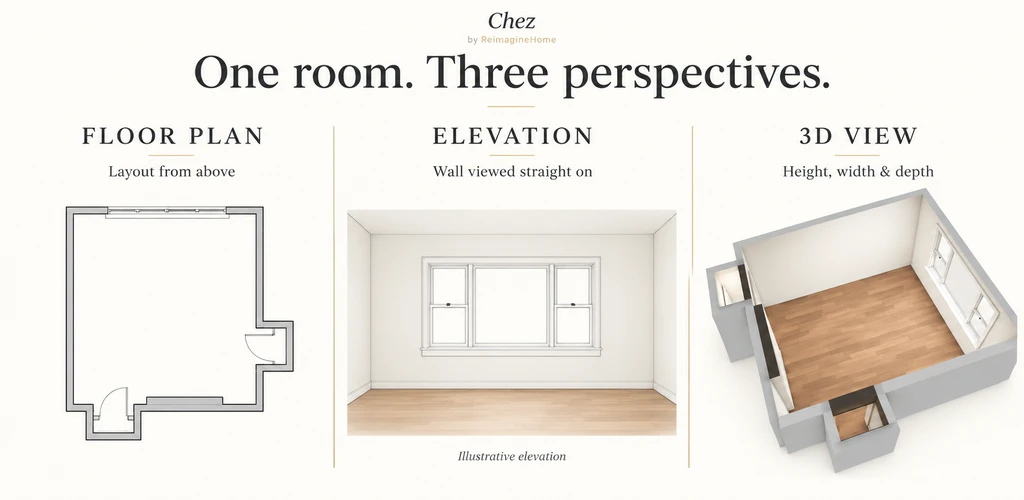
Floor plans, elevations, and 3D views each reveal different aspects of a room. Floor plans show layout from above, elevations depict vertical features on walls, and 3D views let you understand the full space from inside. Combining these views in tools like Chez by ReimagineHome lets you make more confident home design decisions.
Why Switching Views Matters When Planning Your Space
To truly visualize a room makeover, you need more than a single angle. If you’ve ever moved furniture only to realize the flow doesn’t work, or painted a wall and found the color overwhelming, you know the limits of static photos. Interior designers, homeowners, and real estate pros turn to different views, floor plans, elevations, and 3D scenes, to capture all the details that influence both daily use and style.
floor plan vs elevation vs 3D view, is about understanding how these perspectives differ and when to use each for home design. Here’s how each view helps, when it matters most, and how platforms like Chez by ReimagineHome put them in your hands—using your own room photos for results you can trust.
-
Floor Plans: Reviewing Layouts from Above
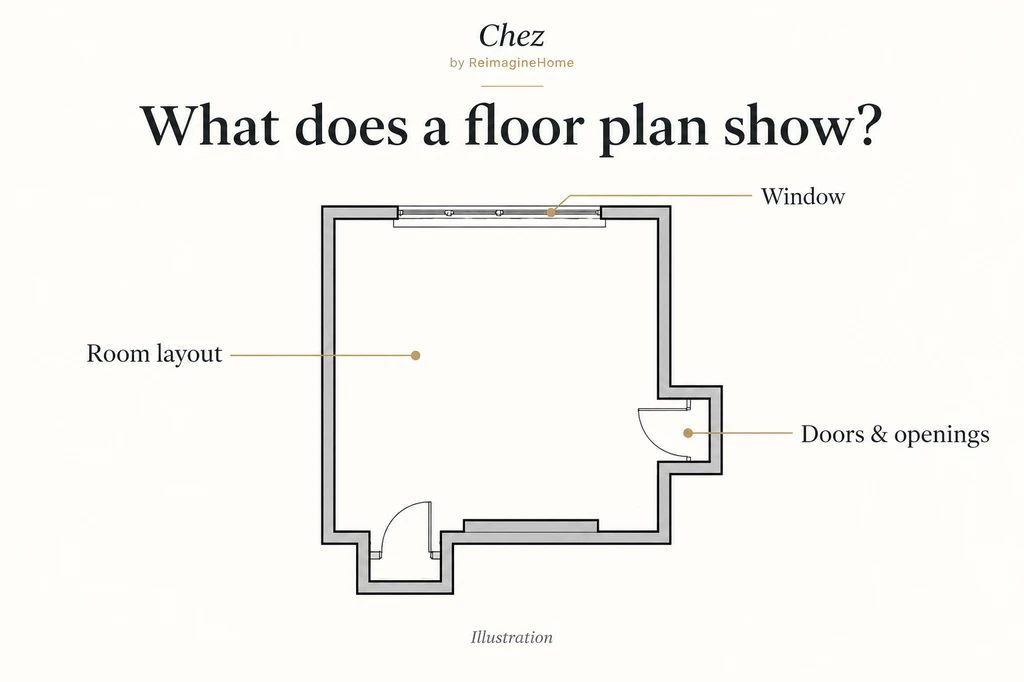
A floor plan shows the room from above, helping you understand its layout and the position of openings.
A floor plan displays a room as if you’re looking down from above, with a horizontal slice through the space. It outlines walls, doors, windows, and sometimes furniture footprints and dimensions. This makes a floor plan a go-to tool for answering, “Where should things go?”
- Walls and room outline
- Door and window locations, including swings
- Major furniture or fixture placement
- Dimensions and circulation paths
For example, when deciding between two sofa placements, a floor plan shows whether a piece blocks a doorway or disrupts the natural path from entrance to seating. It’s the best way to review how your arrangement fits within the room’s structure before moving a single item.
However, floor plans don’t convey how tall items feel or how visually dominant features are. They answer layout, but not experience.
-
Elevations: Exploring Walls and Vertical Relationships
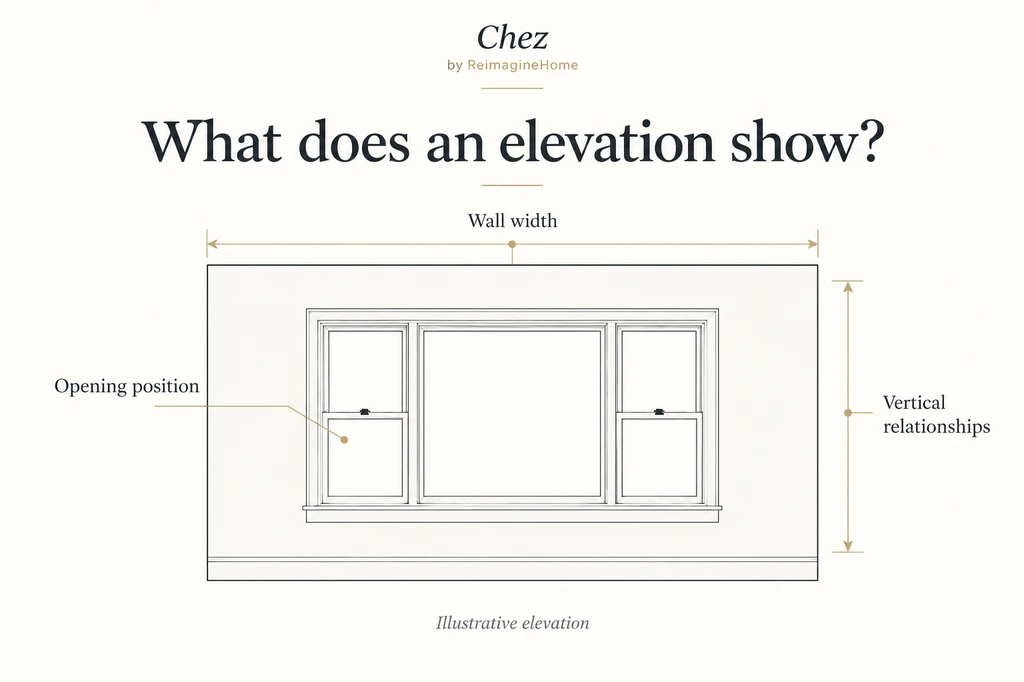
An elevation shows a wall straight on, making vertical relationships easier to examine.
An elevation is a straight-on view of a wall within a room. Unlike a floor plan, it details what appears on a wall vertically, think window heights, artwork placement, built-in shelving, or the proportions between cabinets and openings.
If you want to compare ideas for a feature wall—like shelving beside a window or the best height for sconces, an elevation provides a clear comparison. It’s especially useful when the main question is: “How do things relate vertically?”
Unlike a section (which cuts through the room), an elevation simply faces the wall. Not every interior drawing or digital tool will show all desired details, so always check what’s included in the view.
-
3D Views: Experiencing the Room from Inside
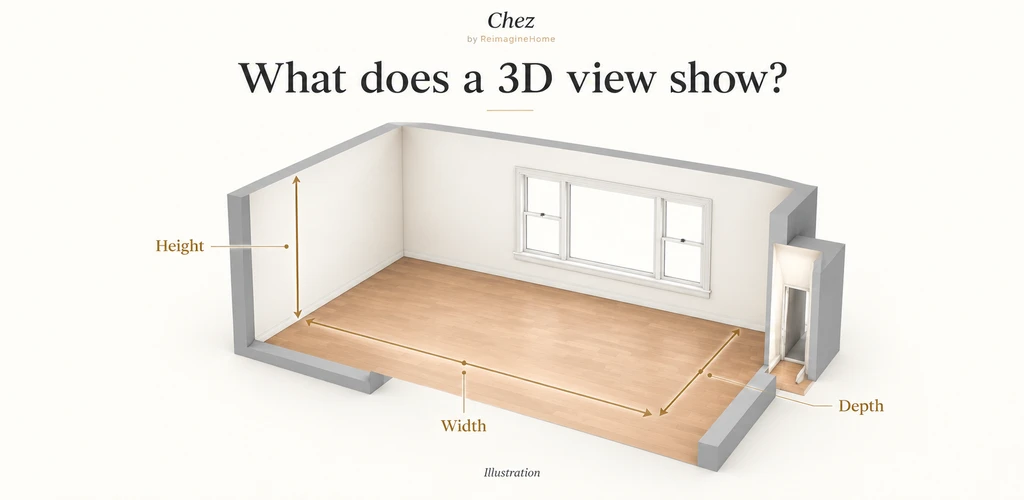
A 3D view brings height, width, and depth together to explain the room’s spatial form.
3D views bring the full spatial context together. With height, width, and depth, you can understand not just what fits but how the space actually feels. These might be interactive scenes you can “walk” through, overhead cutaways, or static perspective images.
- Spatial relationships between furnishings and architecture
- How layouts feel from various viewpoints
- The interplay of colors, textures, and finishes
- Real-world sightlines and focal points
If you want to know, “How does this design look and feel when I’m standing inside the room?”, the 3D view is invaluable. A balanced layout on paper might appear crowded or out of proportion when viewed in 3D from the doorway.
While 3D scenes powerfully illustrate possibilities, always confirm key measurements and product details in real life before making major purchases or decisions.
-
Using Floor Plans, Elevations, and 3D Together in Chez by ReimagineHome
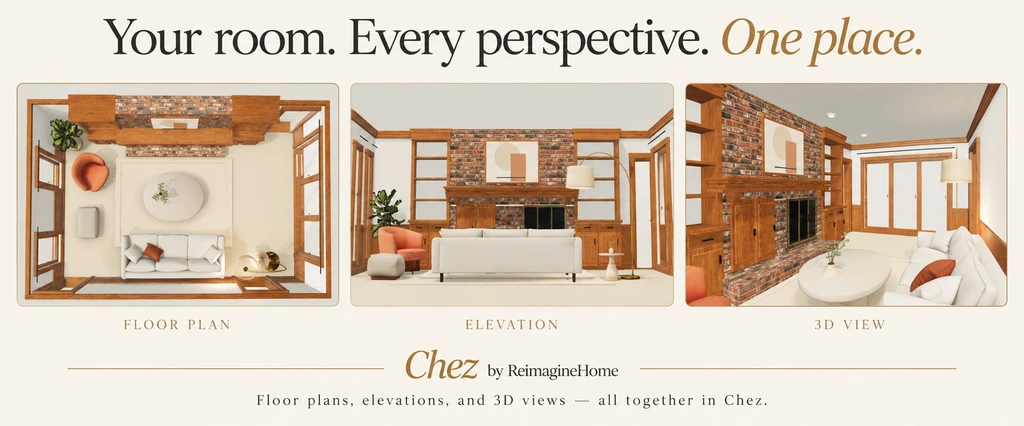
Your room, every perspective—explore floor plans, elevations, and 3D views together in Chez by ReimagineHome.
Chez by ReimagineHome is unique because it starts with photos of your actual room. Those are transformed into a true-to-life 3D model, complete with a generated floor plan and wall elevations. You’re not guessing with a generic template—you’re visualizing and planning for your exact space, down to windows, doors, and even a preserved layout thanks to structural lock. As we explored in our overview of photo-to-3D interior design, this bridges the gap between imagination and actionable design.
- Review the Generated Room: Check how the virtual version lines up with your real room photos. Look for accuracy in doors, windows, and main features.
- Open Floor Plans and Elevations: Switch to the drawings view. Use the plan for layout and the elevations for walls, opening arrangements, and vertical relationships.
- Explore in 3D: Navigate the room from various angles, checking sightlines and the overall feel of the reimagined space.
- Test Layouts and Colors: Add or swap virtual furniture, adjust wall or floor finishes, and see the changes reflected instantly in all three views.
- Refine Step by Step: Use conversational prompts—like “move the table by the window” or “swap the rug”—to iteratively perfect the design.
This workflow allows you to compare, revisit, and combine floor plans, elevations, and 3D scenes for each design decision. You move seamlessly from reviewing a layout (plan), to checking how the sofa sits beneath a window (elevation), to feeling out the space as if you were standing inside (3D).
Learn more about Chez’s capabilities for turning photos into immersive 3D experiences in our guide to exploring your real room in 3D.
-
Which View Is Best for Your Design Question?
Design Question Start With Follow With Where should the furniture go? Floor plan 3D overview and walkthrough How are windows and shelving arranged on this wall? Elevation 3D view How do wall colors and flooring work together? 3D view Physical samples Does this arrangement block movement? Floor plan 3D walkthrough, on-site measurements How can I explain my room to someone else? Most relevant view The others for context Many designers, homeowners, and agents find themselves switching between views as new questions arise. Each method answers something different; together, they provide confidence before any change or purchase.
-
What to Remember: Avoiding Common Visualization Pitfalls
- Details and precision aren’t the same: A polished drawing doesn’t guarantee measurements are construction-ready. Always verify dimensions before building or buying.
- 3D view doesn’t replace floor plans or elevations: Use all three for a full understanding. Plans are best for layout, elevations for wall arrangements, and 3D for experience.
- Elevation views vary in detail: Check what’s included—furniture, finishes, or just windows and openings—to know what information you can trust.
- Generated drawings are for exploration: Chez’s output should guide your decisions, but consult a professional for final construction plans.
The key is using the right view for the right question and validating decisions with on-site measurements whenever needed.
Frequently Asked Questions
- What is the difference between a floor plan and an elevation?
- A floor plan shows a room from above, revealing layout and circulation. An elevation views a wall straight on, showing vertical features and relationships.
- Is a 3D floor plan the same as a walkthrough?
- No, a 3D floor plan is an overhead cutaway. A walkthrough lets you navigate the space from within, experiencing how it feels in real life.
- Which view should I use for arranging furniture?
- Start with the floor plan for layout, then switch to the 3D view to check the arrangement from inside the room and verify movement paths.
- Can I rely on Chez drawings for construction?
- Chez provides estimated dimensions for design exploration. For construction, always double-check measurements and consult a professional for final drawings.
- Does Chez by ReimagineHome provide all these views?
- Yes, Chez generates a 3D room, floor plan, and wall elevations from your real room photos—helping you explore from every perspective.
See Every Angle Before You Decide
Floor plans, elevations, and 3D views are essential tools—each shining a light on different parts of the design process. By switching between them, you’ll see your space as a designer does, understand potential issues sooner, and make decisions you won’t regret. Chez by ReimagineHome lets you do this using your own room photos, giving you clarity and confidence from concept to execution. Whether you’re rearranging furniture or planning a major renovation, use the perspectives that answer your real questions.