How to See Real Products in Your Room Using AI Before Buying

TL;DR
Real Product Staging in REimagineHome AI lets users preview actual, shoppable furniture within their own room images, based on budget and ZIP code. This feature provides visually accurate, purchase-ready furnishings in the context of your home, removing uncertainty and bridging inspiration with affordable, actionable design.
From Wishful Thinking to Shoppable Reality
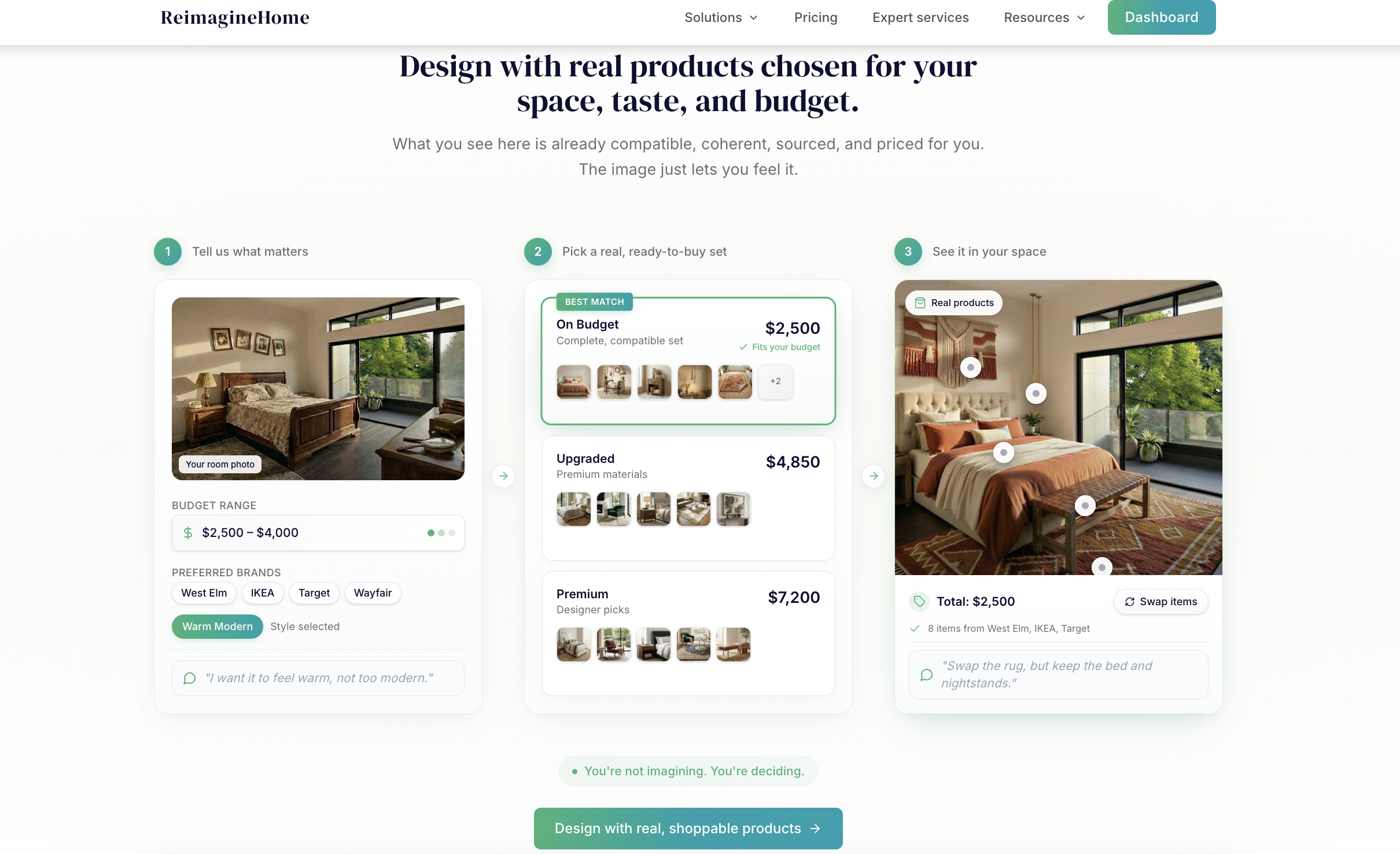
Pick a budget-ready furniture set and see real, shoppable products staged in your room.
Designing a room often starts with inspiration but stumbles when it comes time to put that vision into practice. You may find the perfect layout or fall in love with a style, yet when translating that look into tangible purchases, most people run into a familiar wall: where do you find these exact items—ideally, within your budget, and ready to ship to your door? REimagineHome AI’s new Real Product Staging feature reimagines this process with remarkable practicality. It allows anyone to upload a room or inspiration image, specify budget and ZIP code, and instantly preview real furniture bundles they can actually order. No more abstract renderings, no more guesswork—just actionable, shoppable design that fits your space and your wallet. This leap bridges the gap between digital visualization and real-world, affordable design, offering clarity to homeowners, renters, and even real estate professionals who are ready to move from ideas into action.
-
The Problem: Bridging the Imagination–Reality Gap
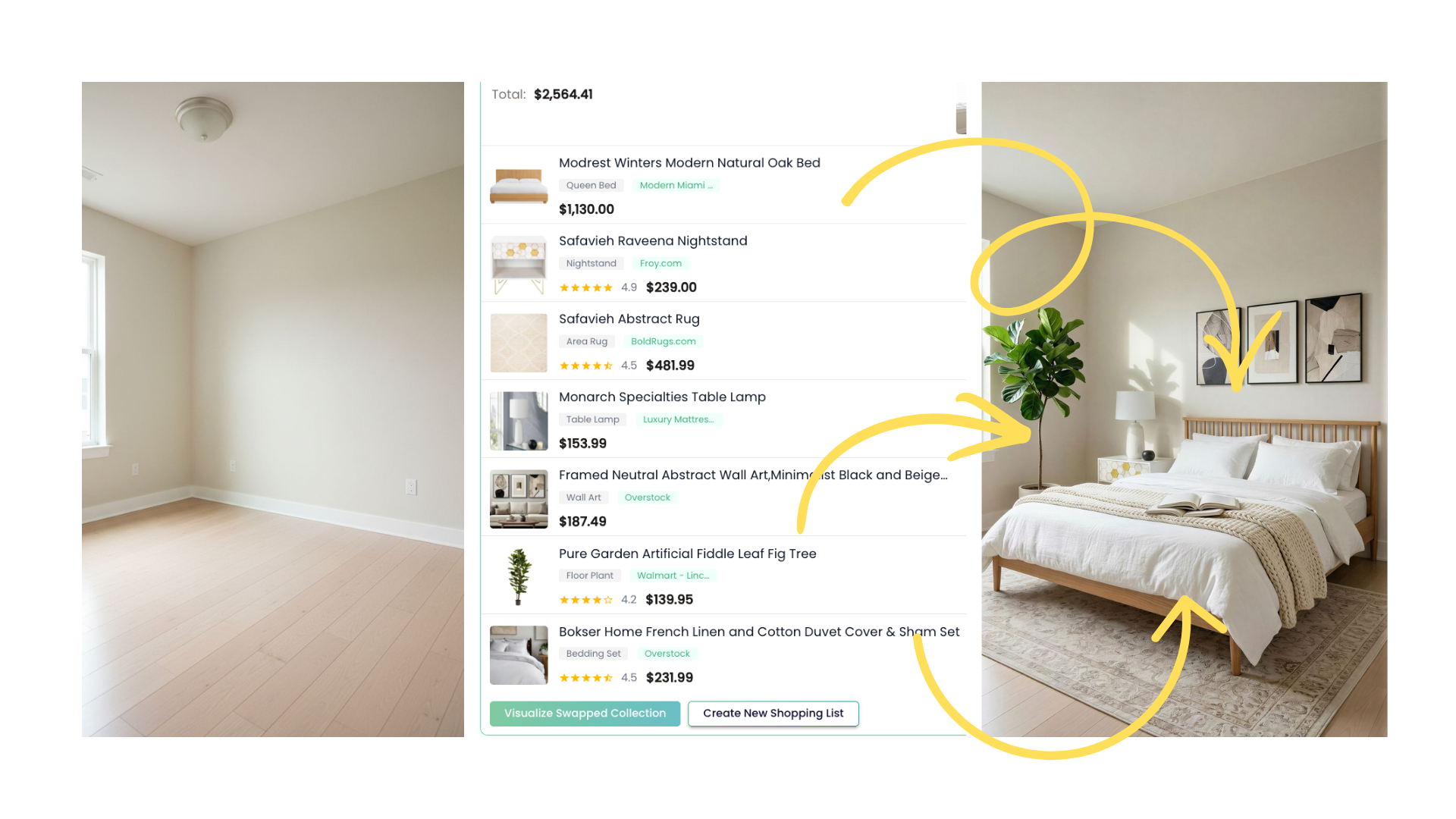
From empty room to real-product staging with a complete, shoppable bundle.
Most virtual staging tools provide visual inspiration using placeholder or generic furniture. While these mock-ups are visually striking, they often leave users frustrated when they realize the impressive sofa or credenza cannot actually be bought or doesn’t fit their budget or location constraints. According to our breakdown of when virtual staging helps (and when it goes too far), realistic design support must extend beyond inspiration—offering honest, actionable recommendations that users can actually implement. Real Product Staging was built to solve this real-world pain point: making sure that the designs you preview reflect products that are truly available, affordable, and deliverable to your address. By integrating shoppable bundles grounded in your preferences and constraints, it grounds inspiration solidly within reality.
Expert Insight
A homeowner in Dallas tried Real Product Staging and was stunned when her staged living room—inspired by a viral social media post—became instantly shoppable, all under her $2,000 budget. Not only did she get to preview the look in her space, but delivery was seamless and precisely coordinated thanks to ZIP code matching.
-
How Real Product Staging Works: Step-by-Step
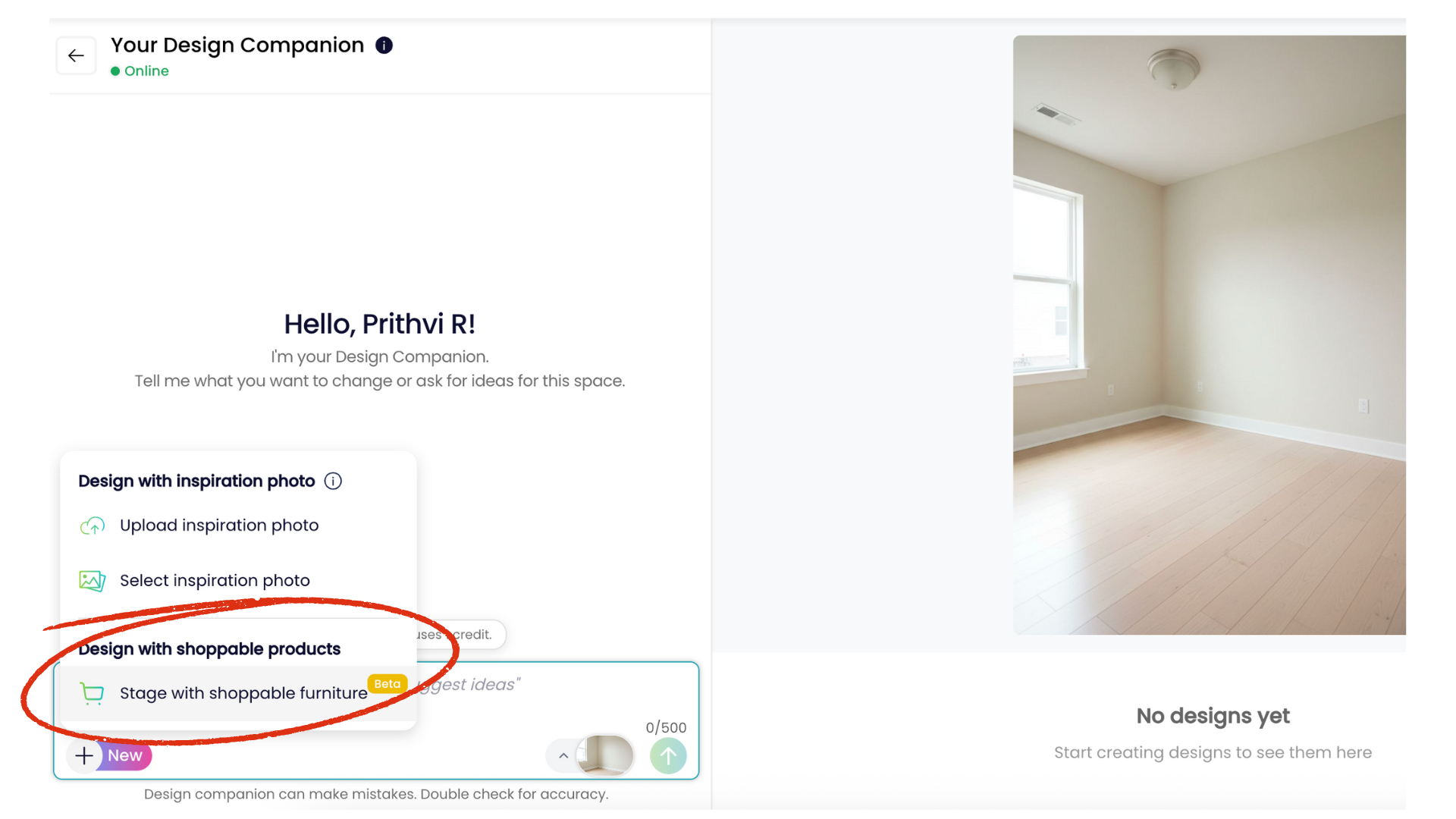
ReimagineHome Design Companion with an empty room and shoppable staging option.
At its core, Real Product Staging lets you preview furniture in your room using AI, but with a practical shift: every item shown is a real, purchasable product, grouped into a shoppable bundle complete with pricing and delivery details.
- 1. Upload Your Room Image: Start by uploading a photo of your unfurnished (or partially furnished) space. You can also include an inspiration image if you have one in mind.
- 2. Set Your Budget: Define your realistic range—whether updating a single nook or furnishing a full home, the tool curates options to keep totals within your set limit.
- 3. Enter Your ZIP Code: This ensures only furniture available for delivery in your area appears in your design, addressing common supply-chain and retailer variation issues.
- 4. (Optional) List Brand/Style Preferences: Share what you love for more targeted results—be it mid-century, farmhouse, or specific brands you trust.
- 5. View Staged Results: Instantly see your room "virtually furnished" with real items that fit both your budget and logistical needs. Each product is labeled, and the total cost is displayed for transparency.
- 6. Explore Bundles & Adjust: Each design comes as a thoughtfully coordinated bundle. You can swap out individual pieces or see alternatives, with real-time updates to the look and cost, avoiding the headache of starting over.
-
Why Budget and ZIP Code Inputs Change Everything
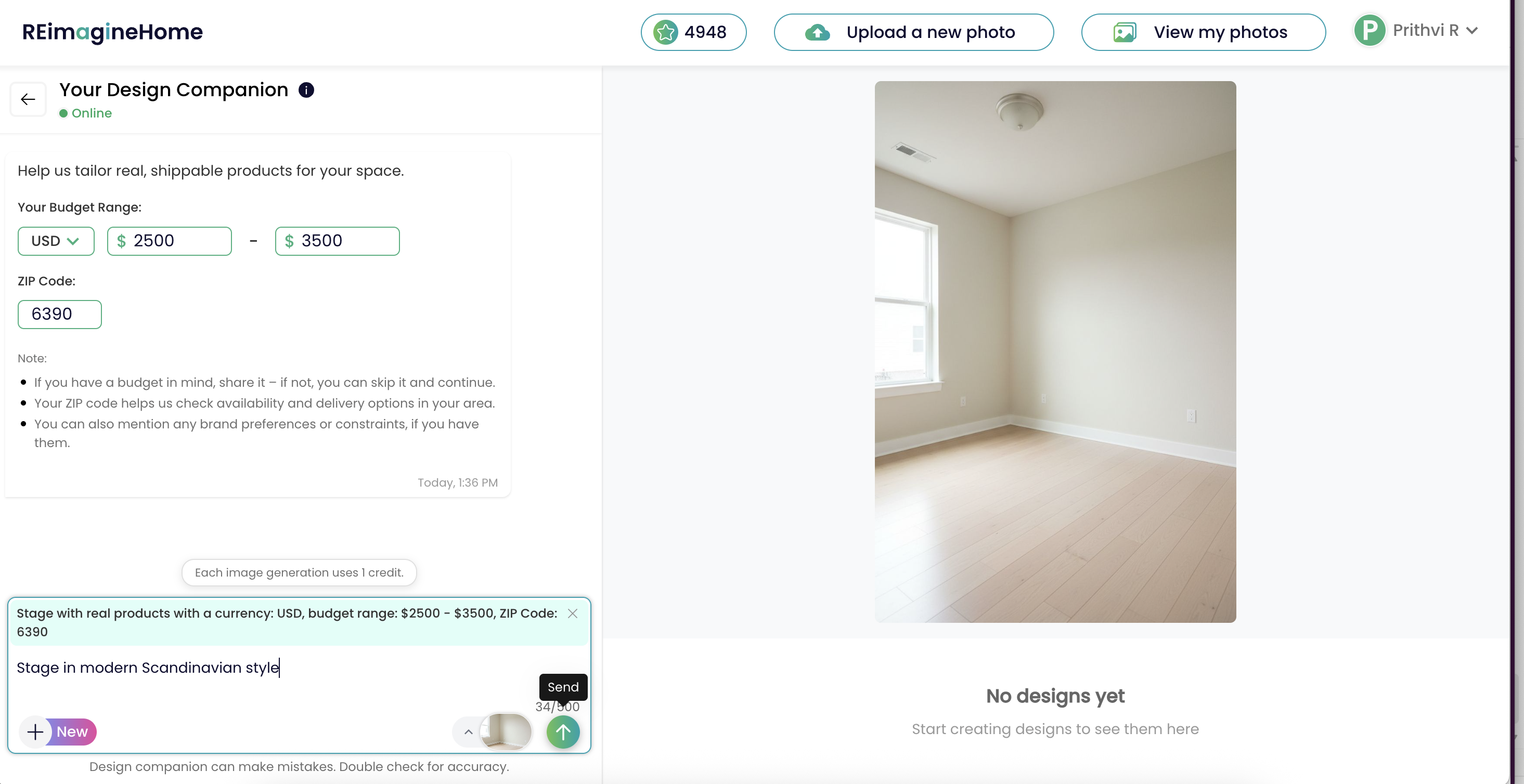
Budget + ZIP input for real-product staging (Scandinavian style).
Setting a budget early isn’t just about controlling costs—it’s about aligning expectations and reducing decision fatigue. When you specify what you’re willing to spend, the AI curates furniture sets that deliver the most cohesive look for your price point, from affordable design to high-end polish. This transparency eliminates last-minute trade-offs and keeps the process straightforward. ZIP code, meanwhile, is a critical innovation: Too often, designers or homeowners fall in love with products, only to discover shipping restrictions or out-of-stock frustrations. By anchoring every recommendation to your location, Real Product Staging keeps each bundle not just beautiful, but possible to obtain—making the leap from aesthetic vision to real-life purchase seamless.
-
Concept Staging vs Real Product Staging: When to Use Each
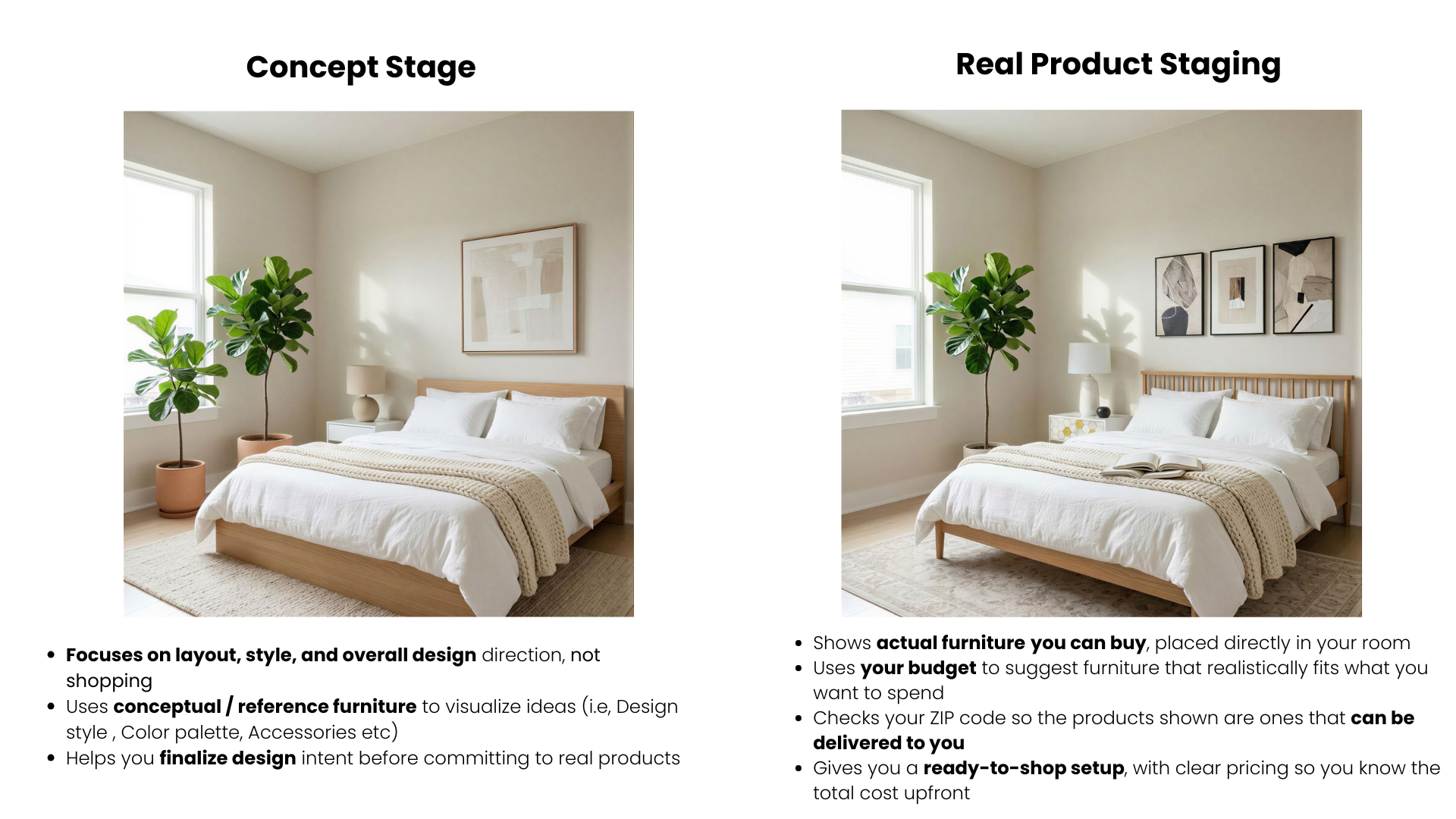
Concept staging vs real product staging (shoppable furniture, budget + ZIP based).
REimagineHome AI respects the spectrum of design workflows—sometimes you want pure conceptual freedom, and sometimes you’re ready for brass-tacks shopping.
- Concept Staging: Ideal at early stages, this lets you try layouts and styles with virtual, not-real items—no pricing or regional availability limits, perfect for blue-sky ideation.
- Real Product Staging: Once you’ve honed your look (or want to skip ahead), switch to Real Products. The AI finds real, visually similar items from local and online stores, crafting shoppable bundles that match your vision as closely as product selection allows.
-
Shoppable Bundles: More Than a Shopping List
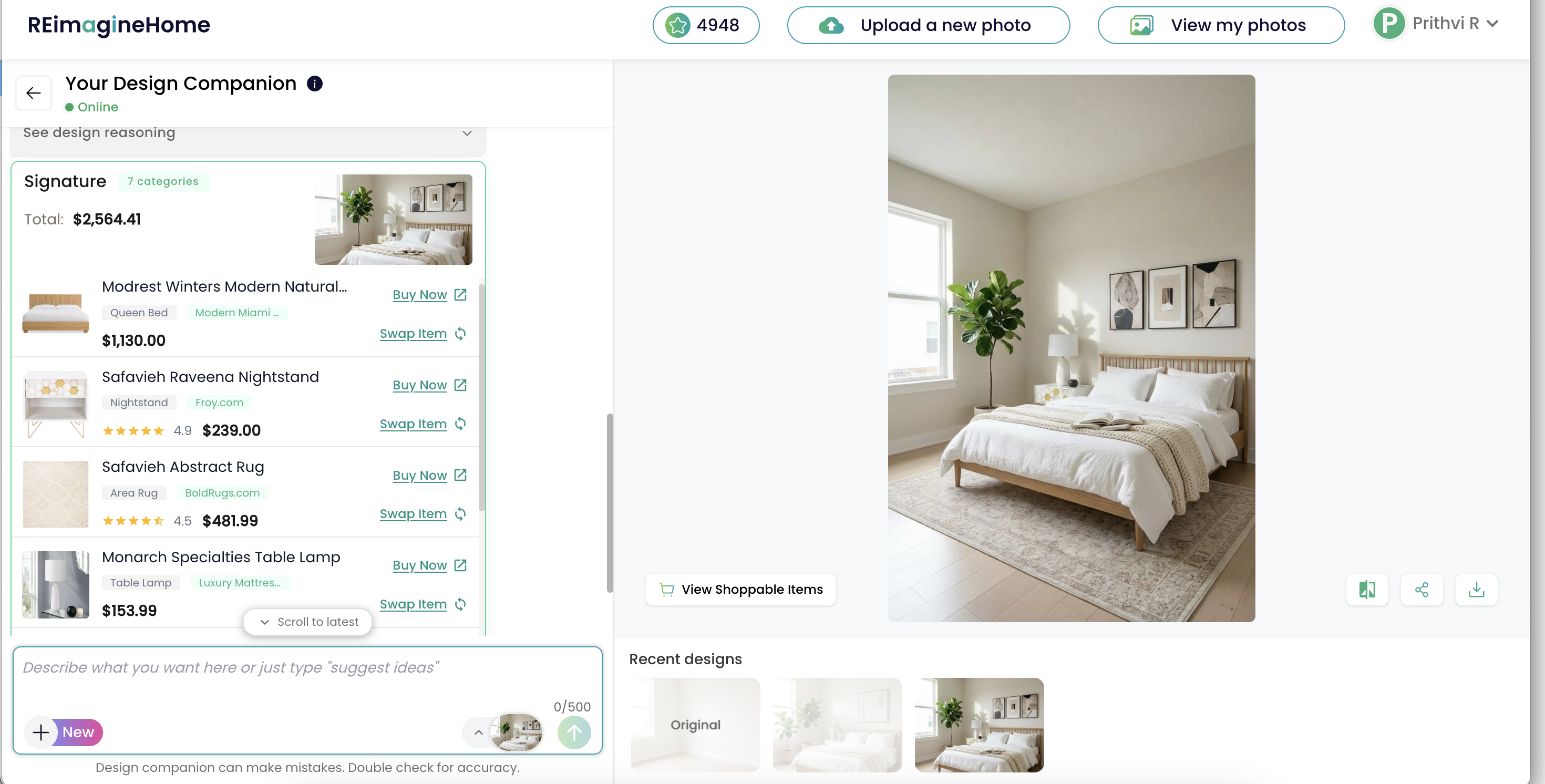
ReimagineHome’s Design Companion showing a modern natural bedroom redesign with a shoppable “Signature” bundle and item swap options.
What sets Real Product Staging apart from conventional online shopping or visualizers is its curated, shoppable bundles. These aren’t random product lists—they’re coordinated sets designed to work visually and logistically in your actual space.
- Each bundle is crafted to stay within your budget.
- Products are guaranteed to ship to your ZIP code.
- Items can be fine-tuned, added, swapped, or removed.
- Total cost is always transparent to avoid surprises.
-
The Flexible Workflow: Adjust, Iterate, Refine
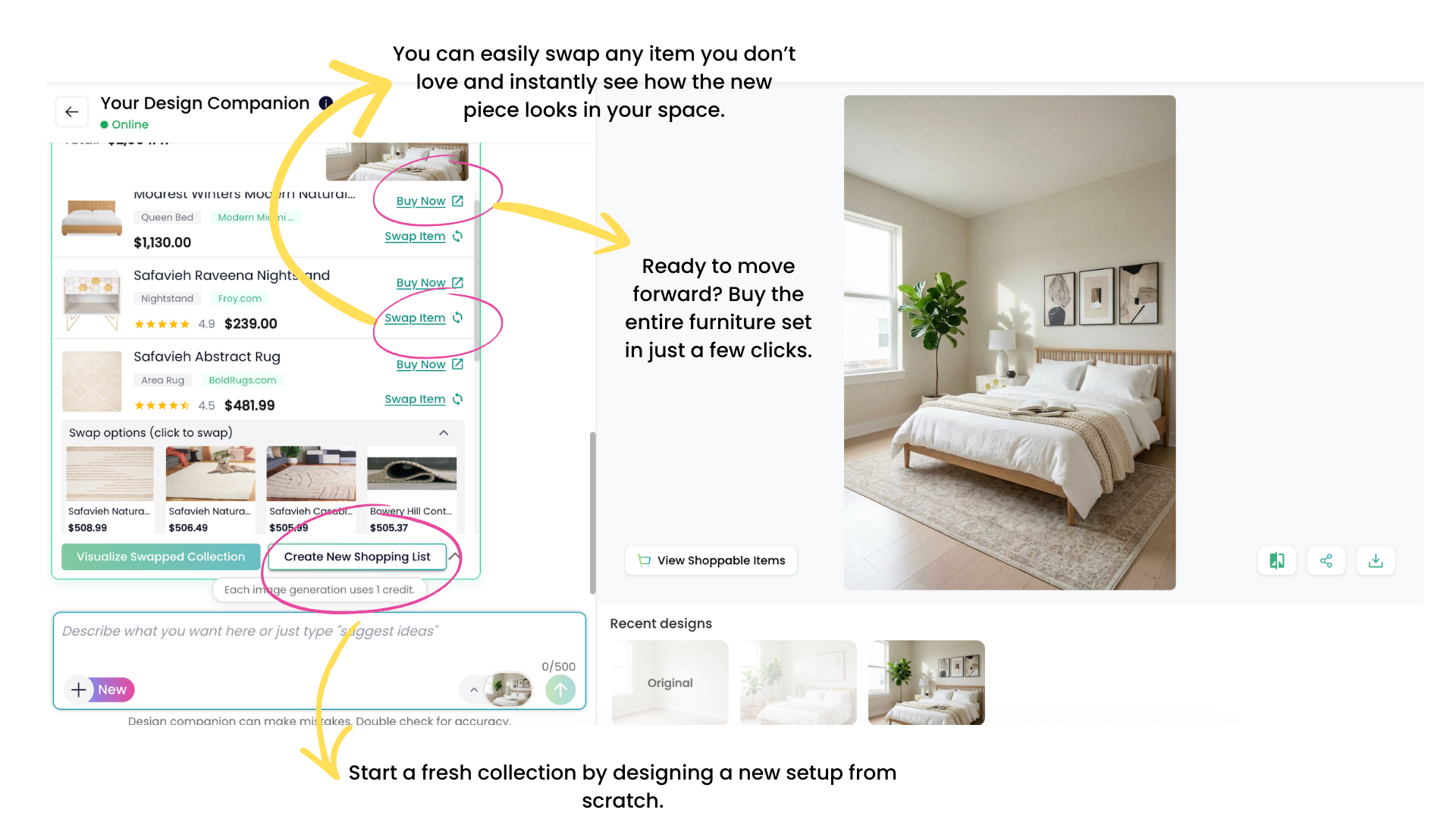
Swap items, preview instantly, and buy the full set with shoppable staging.
Real Product Staging is designed for iteration, not one-shot decisions. You can edit any bundle by swapping items, updating your budget, or changing your ZIP code. The AI updates pricing and images in real-time—so you’re never forced to restart your project at every tweak. This flexibility keeps the process adaptive as your style or needs evolve. For real estate pros and home designers alike, that means less time lost to backtracking and more time crafting spaces that are affordable, shoppable, and genuinely livable.
-
Common Mistakes to Avoid
Even smart design tools can’t rewrite some rules of reality. Three pitfalls crop up most often with new users:
- Confusing Concept and Real Product Staging: Users may expect exact matches from a concept mockup in the real product phase, but products may differ visually or dimensionally. Always review proposed alternatives before falling in love with an initial look.
- Omitting Budget or ZIP Code Settings: Skipping these steps leads to mismatched products that may be out of price range or undeliverable. Input these details early to ensure results you can actually implement.
- Ignoring Bundle Edits: The system generates starting bundles, not final answers. Failing to refine choices means missing opportunities for even better design and value. Don’t be afraid to customize or swap items as you go.
-
Tips & Tricks from the Pros
Experienced designers and homeowners maximize value and realism with a few well-honed strategies:
- Set a “Stretch” Budget: Input your base budget, then test with a slightly higher limit. This reveals what meaningful upgrades—like a better sofa or statement light—may cost compared to your essentials.
- Upload Clear, Well-Lit Photos: Sharp, daylight room images help the AI place products accurately and showcase finishes and colors as they’ll appear in real life.
- Start with Broad Preferences: Keep your style filters flexible at the outset. The more options the system has, the more likely you’ll find a satisfying bundle. Narrow down as items catch your eye.
-
See Actual Space Designed with Real Products
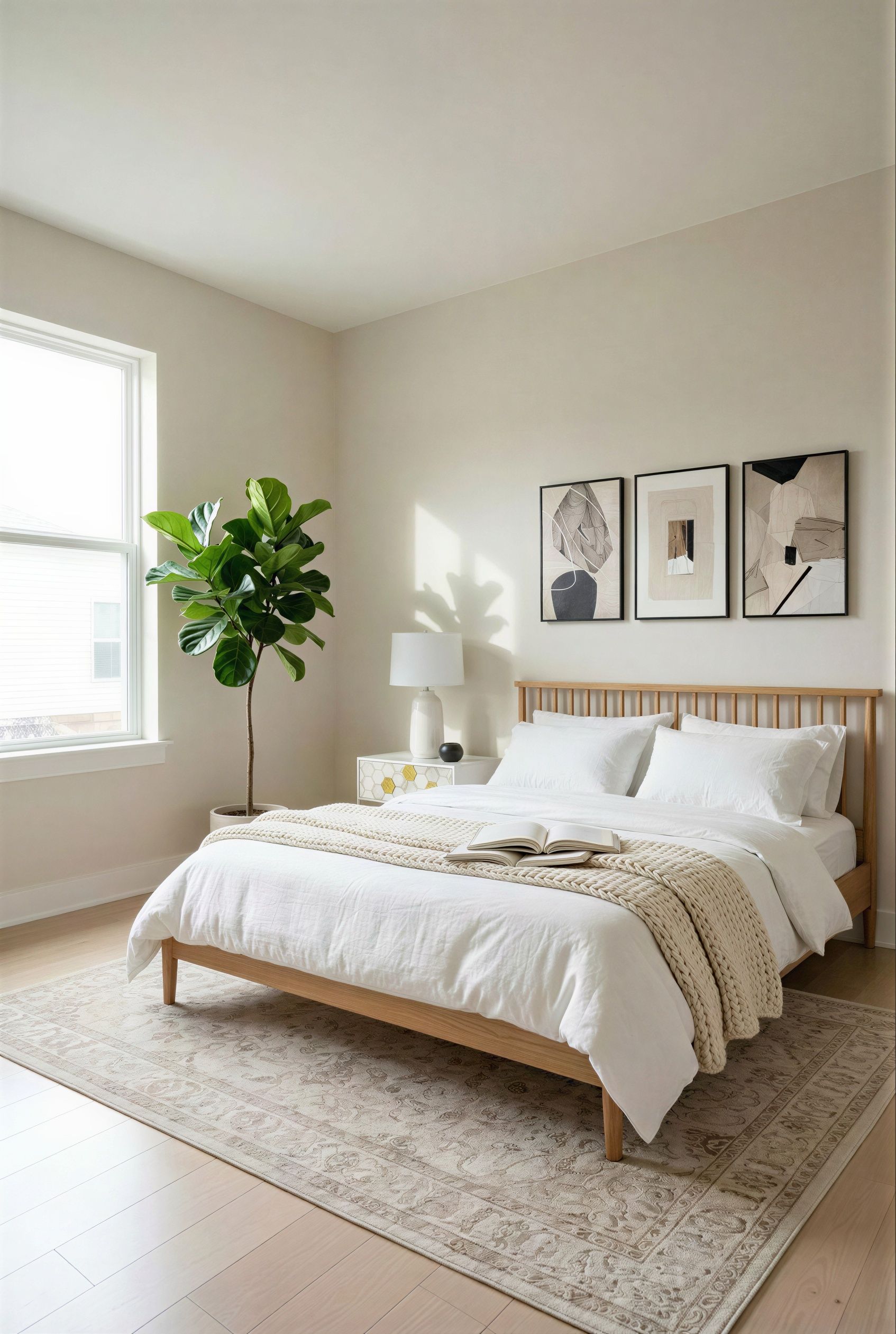
Real product staging: modern neutral bedroom with shoppable furniture.
- Natural oak-finish platform bed — anchor for the layout, scale-appropriate to the room and consistent with the reference palette.
- Whitewashed and brass-accented nightstand — provides side storage and tactile contrast to the warm wood grain of the bed.
- French linen and cotton duvet set — layers softly over the bed, balancing warmth, breathability, and understated color.
- Abstract ivory and beige rug — defines the bed zone, ties together the neutral palette, and adds graphic interest beneath foot.
- Minimalist black and beige framed wall art — references the geometric influences of the inspiration imagery, adding vertical focus near the bed.
- Modern cream ceramic table lamp — offers soft lateral lighting and a textural element compatible with other surfaces.
- Artificial fiddle leaf fig tree — adds height and organic form, echoing biophilic design trends while sidestepping maintenance concerns.
Visualization Scenario
A first-time apartment renter uploads an empty room photo and selects a budget for affordable design. Within moments, their screen fills with real, deliverable furnishings—from a plush bedframe to a splashy accent chair—while the price never exceeds their limit. Every edit updates the look and the final shopping list, proving that great style and careful spending can finally meet without compromise.
Quick FAQ: Real Product Staging in Practice
- Can I really buy every product shown in my staged room?
Yes, every item in the Real Products bundle is linked to a retailer that will deliver to your ZIP code, though real-time inventory can affect availability. - Does the design process require professional photography?
No, but sharp, well-lit images help achieve more accurate virtual staging and furniture sizing. - Can I edit individual items within a bundle?
Absolutely. Swap or remove items, adjust the budget, and see instant updates without restarting the whole design. - Will this feature work for all US ZIP codes?
Most major regions are covered, but rural or remote areas may see fewer options due to shipping limits.
From Inspiration to Reality: A Smarter, Actionable Way to Design
Bringing an idea to life often felt overwhelming—until now. With Real Product Staging, REimagineHome AI unites inspiration, practicality, and seamless shopping in one guided process. By centering design on your room, your budget, and what’s actually available to you, this feature clears the fog between dreaming and doing. Whether you’re staging for sale, furnishing a new home, or reinventing a single room, Real Product Staging delivers tangible results—and a direct path to a beautiful, attainable space.