
TL;DR
AI Style Swaps let you redesign a furnished room from a photo — test wall colors, swap rugs and curtains, scale art correctly, and explore new moods without repainting. It’s the fastest way to answer “is this room boring?” and see how to fix it with color, texture, and lighting. Try it in minutes with ReimagineHome.ai’s Style Swaps tool and decide on changes you’ll actually love. If you’re searching “how to digitally repaint walls before buying paint,” this is the practical, low-risk path.
The Real Cost of Showing Rooms ‘As They Are’ Online

Style Swaps lets you preview bold new looks like curtains and rugs before committing to changes.
Style Swaps is AI interior design from a photo: you upload your room and instantly try on different palettes, textiles, and decor styles without moving a thing. It’s a powerful fix for repaint regret and “neutral-but-dull” spaces because you can preview options — from warm curtains to a deep accent wall — before you spend time or money.
- Results first: See how new wall colors, curtains, rugs, lamps, and art scale change the mood in seconds.
- Realism: Outputs keep architecture and proportions intact so choices feel plausible.
- Speed: Get 4–8 variations in minutes; iterate until it clicks.
- Cost: Free to test ideas; only invest in the pieces that look right.
- Workflow: Great for north-facing rooms, undecided color palettes, and mixing one bold piece (like a bright chair) with calmer walls.
- ROI: Better photos pull more clicks and confidence — for listings and for your own remodel decisions.
- Peace of mind: Answer “Should I repaint?” with visuals, not guesswork.
If you already have a tricky room photo in mind, upload it to ReimagineHome.ai and test this solution on a real image while you read.
Why This Visual Problem Hurts More Than You Think

Neutral palettes in north-facing rooms can appear flat and cold, affecting the room's inviting feel.
Even simple color choices influence how large, warm, and inviting a bedroom feels on screen. North-facing rooms, especially, can make off-whites look gray and lifeless; buyers and guests translate that to “cold” — even when the space is well designed.
Here’s how it shows up: you scroll past a neutral photo because nothing anchors the eye. Curtains blend into the walls. The rug reads muddy next to the flooring. Art is undersized, so the headboard wall feels bare. In person, it’s calm; on a phone screen, it’s forgettable. And repainting on a hunch is expensive and disruptive.
The better move is to test a few targeted changes — richer drapes, a patterned wool rug, one properly scaled art piece, a moody accent wall, warmer lamp light — and pick a direction with confidence. That’s exactly where AI room design shines.
Anecdote
That neutral bedroom that felt serene in person but flat on camera — curtains vanished into the walls, the jute rug looked muddy, and the tiny art above the bed made the space feel unfinished. One Style Swap later: mustard drapes, a patterned rug that loves the floors, and a single moody green accent wall. The room finally had a heartbeat.
What Style Swaps Actually Is (In Plain Language)
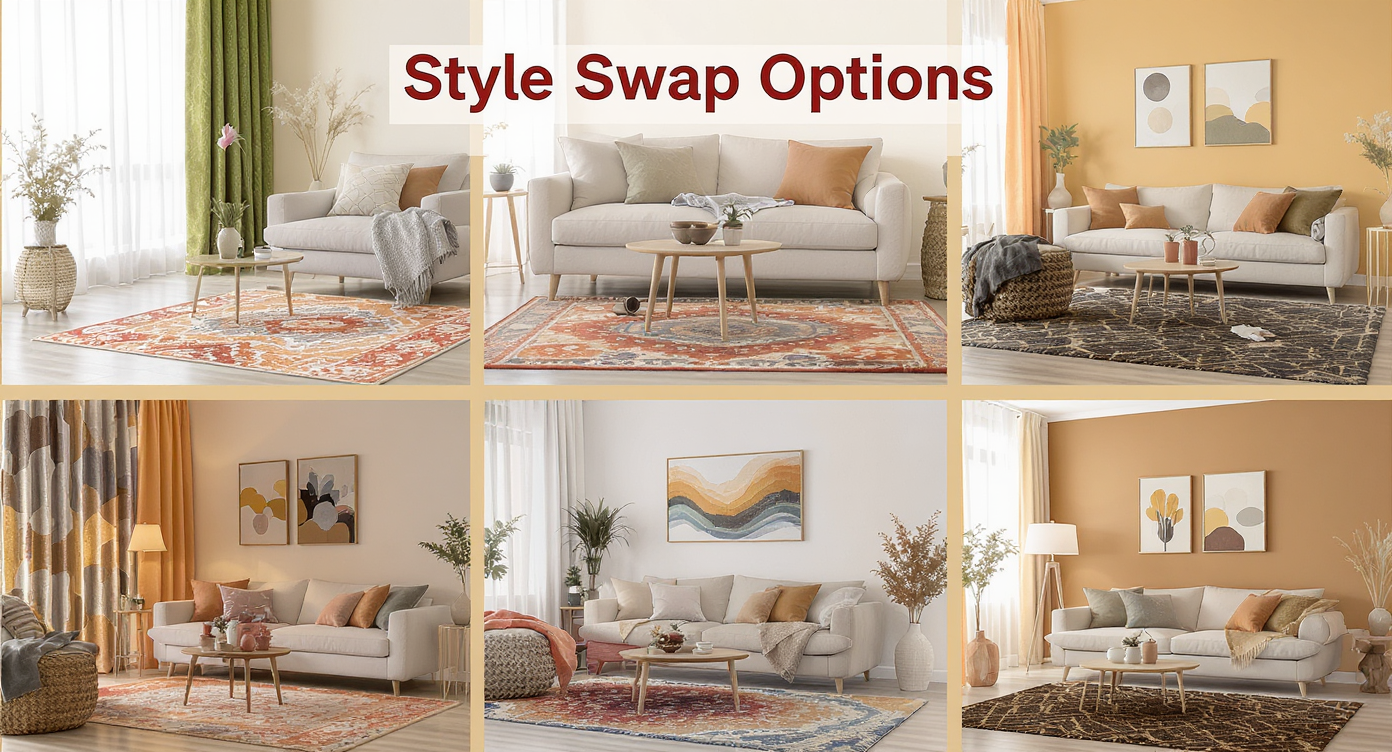
Style Swaps lets you try diverse textiles and palettes directly on your room photo for easy visual decisions.
Style Swaps is a room makeover AI that redesigns a furnished space from your photo — think “try on” mode for your bedroom. You keep the bones (floors, windows, fireplace), while the AI proposes cohesive alternatives: color temperatures that suit north light, curtain patterns that don’t vanish into the walls, rugs that harmonize with your floors, scaled art that actually fills the headboard wall.
Inside ReimagineHome, this lives as ReimagineHome.ai’s Style Swaps tool. You upload a single image, choose a vibe (cozy, classic, modern, eclectic), and preview combinations of wall color, textiles, lighting, and decor that match your architecture — not a generic showroom.
How Style Swaps Works Step by Step
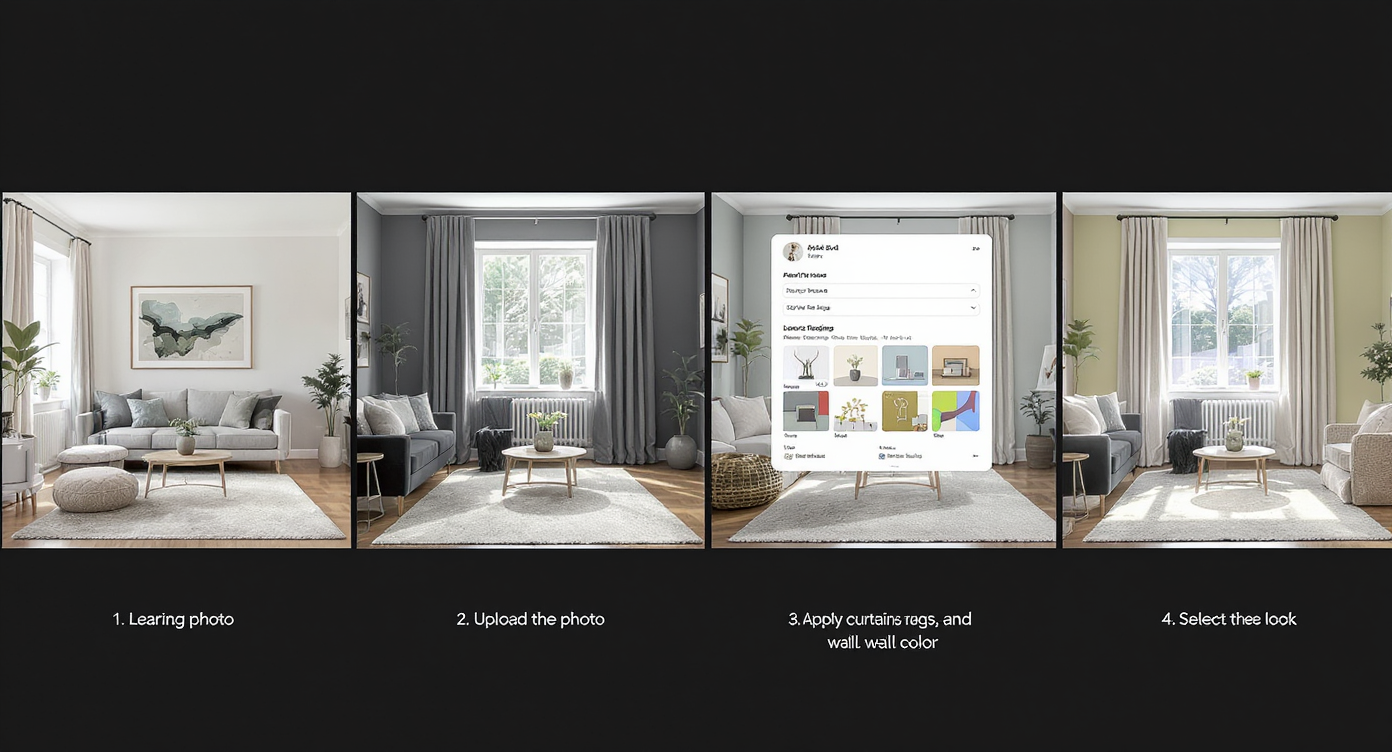
How Style Swaps works: upload photo, preview multiple design options, and make confident style choices.
Good inputs yield better outputs; aim for clear, straight-on photos at 2500–4000 px on the long edge.
- Choose the right photo(s): Pick the angle that shows your problem areas — headboard wall, windows/curtains, rug and floor relationship, fireplace or built-ins.
- Upload to ReimagineHome.ai: Drag your image into the workspace.
- Select Style Swaps: From the toolset, choose the redesign option for furnished rooms.
- Pick a direction: Try cues like warm minimal, classic with pattern, cottage floral, moody green, or modern-neutral with a bolder rug.
- Dial in details: Ask for a deeper curtain color, a patterned wool rug, scaled art above the bed, or a single accent wall (behind the headboard is the least risky).
- Generate and compare: Review multiple variations side-by-side; save your top contenders.
- Refine realistically: Keep ceilings and trim consistent unless you plan to change them; avoid drastic floor color changes if you’re not replacing flooring.
- Export for decisions: Save high-res images for your mood board, share with a partner, or align with a stager or contractor.
Need to clear visual noise first? You can quickly remove a clashing rug or random clutter with its clutter and object removal tool before you explore new styles.
Tips and Tricks for More Realistic Results

Focus on one hero element per view, like bold drapes, to achieve compelling and realistic style updates.
Rule of thumb: change one hero element per view — drapes, rug, or wall color — and harmonize everything else to it.
- North light wants warmth: Choose creamier off-whites, ochres, terracotta, or deep green/blue accents; cool grays often read drab.
- Let curtains lead: If walls are neutral, pick drapes that contrast — e.g., warm mustard, rust, or a floral/stripe that echoes your floors — so they don’t disappear.
- Scale your art: Above a queen bed, 30–40 inches tall (or a wide triptych) usually looks right; tiny pieces make the room feel unfinished.
- Rug harmony beats “match”: Patterned wool with muted reds/navies/ivories bridges wood tones and bedding better than flat jute in many bedrooms.
- Accent wall logic: Put it behind the headboard to add depth without shrinking the room; keep side walls light to preserve bounce light.
- Repeat your darks: If you have a black fireplace or iron bed, repeat black in frames or lamps so it feels intentional.
- Test with the bold piece in mind: If an electric-blue chair is coming, build a palette that nods to it (curtain stripe, rug flecks, art) so it doesn’t feel like an island.
If you want to see the room totally emptied before choosing an accent wall, use ReimagineHome.ai’s Occupied → Vacant tool to get a blank canvas, then return to Style Swaps with a clear direction.
Visualization Scenario
Upload your north-facing bedroom, ask for “warm minimal with pattern,” and generate four variations. Compare creamy off-white walls + ochre drapes vs. deep green headboard wall + navy floral rug. Pick your favorite and shop with certainty.
FAQ
Can AI digitally repaint walls before I buy paint?
Yes. Style Swaps previews wall colors, accent walls, and trim choices on your actual room photo, so you can compare options and avoid repaint regret.
How realistic are Style Swaps for furnished rooms?
Outputs preserve your architecture and scale while proposing cohesive rugs, curtains, lighting, and art. They’re close enough to guide purchases and paint decisions confidently.
What resolution works best for AI room design?
Upload clear images around 2500–4000 px on the long edge. Small or blurry photos limit detail and realism.
Can I try “how to swap furniture style digitally” without buying new pieces?
Yes. Use Style Swaps to explore modern, classic, cozy, or eclectic looks; then buy only the items that match your favorite render.
Should I repaint a north-facing room or add color with decor?
Test both. In many north-facing spaces, warmer curtains, a patterned rug, larger art, and a single accent wall deliver more impact than repainting all four walls.
Visualize Your Next Listing (or Project) Before You Commit
Previewing renovation or color changes visually prevents costly repaint regret and misaligned purchases later. With Style Swaps, you can rehearse a calmer-neutral scheme or a moodier, patterned story — and make the room’s best features (floors, fireplace, windows) sing.
Give your space that last 10% of intention without guesswork. Open a photo, explore a few palettes, and pick the one that feels like you. Start with ReimagineHome.ai’s Style Swaps or jump into the full toolkit at ReimagineHome.ai to create rooms that look as inviting on screen as they do in person.