TL;DR
AI landscaping design from a photo lets you preview plant palettes, edging, and pathways on your real facade in minutes. It’s the quickest way to test curb‑appeal ideas, compare low‑maintenance options, and avoid costly rework. Try a live upload with ReimagineHome.ai’s AI landscaping tool to visualize changes now: AI landscaping from a single exterior photo. If you’re searching for a “free AI landscape generator from photo,” you’ll still benefit from pro‑grade realism, speed, and control here—especially when decisions feel high‑stakes.
The Real Cost of Guessing Your Front Yard Design

See how AI overlays realistic planting plans on your home's photo for instant design previews.
AI landscaping from a photo is a design tool that places new plants, beds, and hardscape ideas directly onto an image of your home. It’s powerful because you instantly see scale, color, and maintenance trade‑offs on the exact front yard you’re about to invest in.
- Results first: Preview curb appeal—plant heights, seasonal color, edges, and paths—on your real facade.
- Realism: True‑to‑scale compositions help avoid overgrown corners and “green meatball” shrubs.
- Speed: Generate multiple yard design ideas in minutes.
- Cost control: Compare low‑maintenance vs. showy designs before buying plants.
- Workflow: Upload a photo, choose style goals, generate, refine, and export.
- ROI: Better curb appeal, fewer mistakes, and less weekend rework.
- Peace of mind: Decide with confidence, even if gardening isn’t your hobby.
If you already have a tricky front yard photo in mind, upload it to ReimagineHome.ai and test AI landscaping on a real image while you read.
Why This Visual Problem Hurts More Than You Think

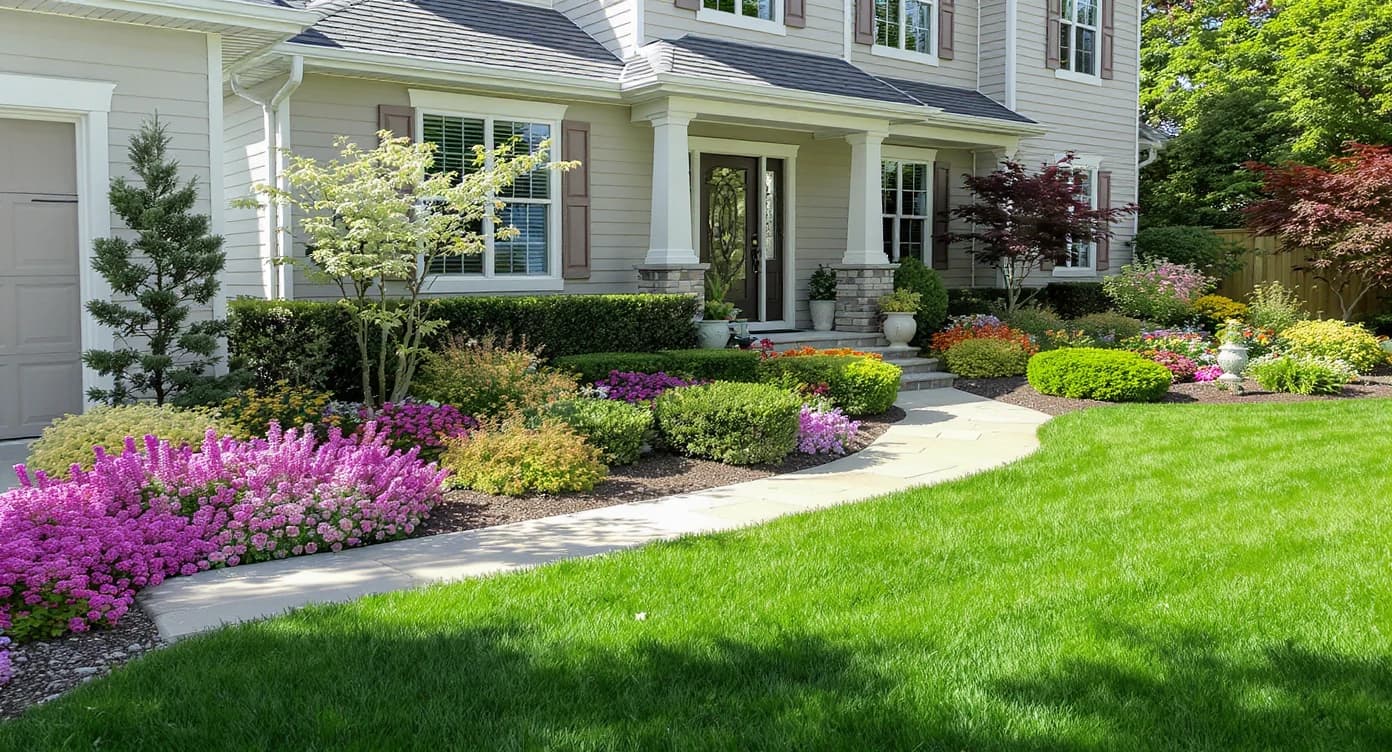
Incorrect plant scale and color splay curb appeal; well-planned layers create inviting landscapes.
Most front yards that feel “off” share the same pattern: plants at the wrong scale, flat color in the shoulder seasons, and edges that don’t clearly guide the eye to the door. That’s why endless browsing rarely fixes the overwhelm—you’re looking at pretty gardens, not your garden.
On screen, buyers and neighbors react fast. A crisp planting outline and a welcoming path make a home feel cared for and easy to approach. For homeowners who don’t love yard work, the goal isn’t more plants; it’s better placement and a palette that looks good nine months a year with minimal pruning. AI landscaping helps you audition that mix—foundation evergreens for structure, one or two focal trees for height and bloom, and low, layered perennials or groundcovers to soften the base—so your decisions move from guesswork to a plan.
Anecdote
That big, over‑pruned “green meatball” shrub by the corner? In the AI preview, we swapped it for a taller, airy ornamental tree, layered evergreens for structure, and suddenly the facade looked intentional—no hedge‑trimmer required.
What AI Landscaping Actually Is (In Plain Language)

AI landscaping reimagines your yard by overlaying new garden ideas directly on your home photo.
AI landscaping is a photo‑based design generator that remixes your front yard with new beds, plant combinations, mulch, edging, and even lighting on top of a single image. You provide the photo; the tool proposes realistic compositions you can tweak.
To try it on your home, open ReimagineHome.ai’s AI landscaping solution. You’ll get fast, visual options that honor your facade, walkway, and driveway, then you can iterate toward low‑maintenance, native‑leaning, or four‑season looks as needed.
Output is a set of high‑quality images you can compare, share, and use as a shopping or install guide—especially helpful if you’re hiring a crew and want alignment before anyone digs.
How AI Landscaping Works Step by Step
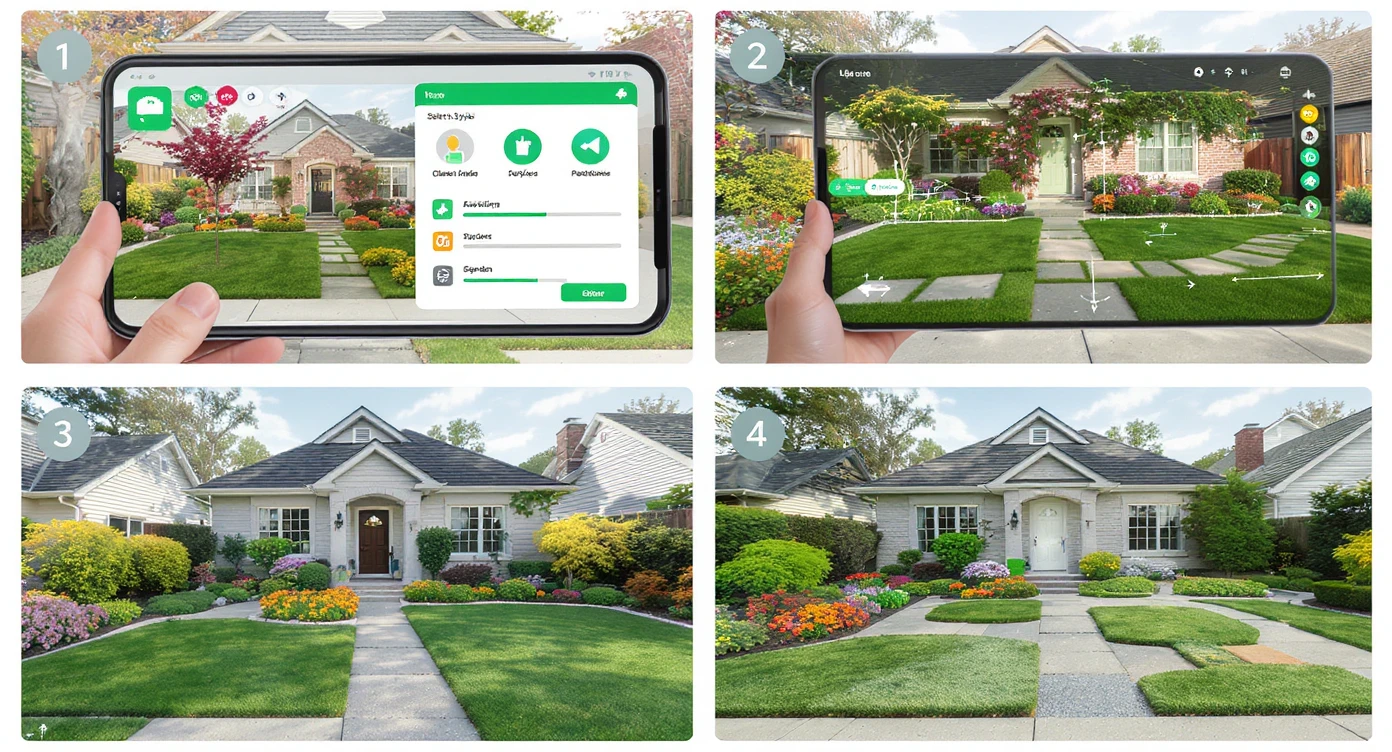
Follow these four steps to create your personalized AI-assisted yard design from your photo.
- Choose the right photo: A clear, front‑facing shot that shows the full foundation, entry path, and driveway edge works best. Avoid heavy shadows if possible.
- Check resolution: For crisp results, aim for at least 2000–3000 pixels on the long edge. Phone photos in good light are usually fine.
- Upload to ReimagineHome.ai: Start a new project and select the landscaping option.
- Set goals: Pick style and priorities—low‑maintenance, native plants, evergreen structure, drought‑tolerant, colorful foundation border, or “add a focal tree.”
- Generate concepts: Review several AI yard design variations. Note plant heights, bed shapes, and how the design frames windows and the door.
- Refine: Keep a favorite structure (e.g., layered evergreens + a small ornamental tree) and iterate on color or edging. Adjust bed depth so plants won’t crowd siding or walkways.
- Export: Save the final images for your installer or your weekend project list.
Constraint to respect: Leave 18–36 inches between mature plant spread and walls/walkways for airflow and maintenance. Designs that look tight on screen will feel crowded in real life.
Tips and Tricks for More Realistic Results

Use plant layering and texture variety to achieve natural, realistic landscaped curb appeal.
Good landscaping reads like a triangle: taller anchors at the corners, a mid‑story layer, then low groundcovers along the front edge.
- Pick one hero tree, not three. A compact ornamental (think small dogwood or Japanese maple size) near the corner can add height without blocking windows.
- Evergreen backbone first. Use 60–70% evergreen massing along the foundation for year‑round structure; layer seasonal color in front.
- Right plant, right size. In AI previews, check mature widths. If a shrub looks like a “green meatball” in five years, size down or switch species.
- Define the edge. A clean bed line and consistent mulch color add instant polish; the AI helps test curves versus straight lines before you cut sod.
- Plan four‑season interest. Mix bloom times and foliage textures so the facade doesn’t go flat from November–March.
- Lighting matters. Low, warm path lights and an accent on the focal tree make evening curb appeal effortless.
- Considering hardscape changes? If you’re widening a walk or adding steps, pair your plan with ReimagineHome.ai’s exterior render tool to preview stone, brick, or concrete choices alongside plantings.
Visualization Scenario
Upload a sunny, front‑facing photo. Ask for a low‑maintenance, four‑season design with a focal tree on the left corner, evergreen foundation massing, and a curved bed edge with groundcovers along the path. Compare two versions: one with variegated foliage for pop, another with warm pink‑white blooms for spring.
FAQ
What is AI landscaping design from a photo?
It’s a tool that overlays new beds, plants, and hardscape ideas on an image of your home so you can compare realistic yard design options quickly. Try it with ReimagineHome.ai’s landscaping tool.
Will the AI respect plant sizes and zones?
Previews aim for real‑world scale and composition. Always confirm mature sizes and hardiness for your zone when finalizing a plant list.
How accurate are the results for spacing and maintenance?
Visuals are planning‑accurate for layout and scale. For care needs, choose species known for your region; the preview helps ensure you’ve left enough airspace and access around beds.
What resolution photo do I need for good results?
Use a clear, well‑lit image with at least 2000–3000 pixels on the long edge. Include the full facade, walkway, and driveway edge for context.
Can I ask for low‑maintenance or native plant designs?
Yes. Set priorities like low‑maintenance, drought‑tolerant, or native‑leaning in your prompts to get designs aligned with your lifestyle and climate.
Visualize Your Next Listing (or Project) Before You Commit
Design clarity beats plant shopping every time. With a single photo, you can try low‑maintenance palettes, test bed shapes, and land on a front‑yard story that fits your lifestyle and climate—before anyone lifts a shovel. If you’re a homeowner who wants curb appeal without constant care, or an agent prepping a listing that needs a lift, this is how you get there faster and with fewer regrets.
Start now with AI landscaping on ReimagineHome.ai, or open a fresh project on the home page and see your front yard’s best version in minutes.