ReimagineHome AI Updates: Design, Shop, and Plan Your Dream Space
TL;DR
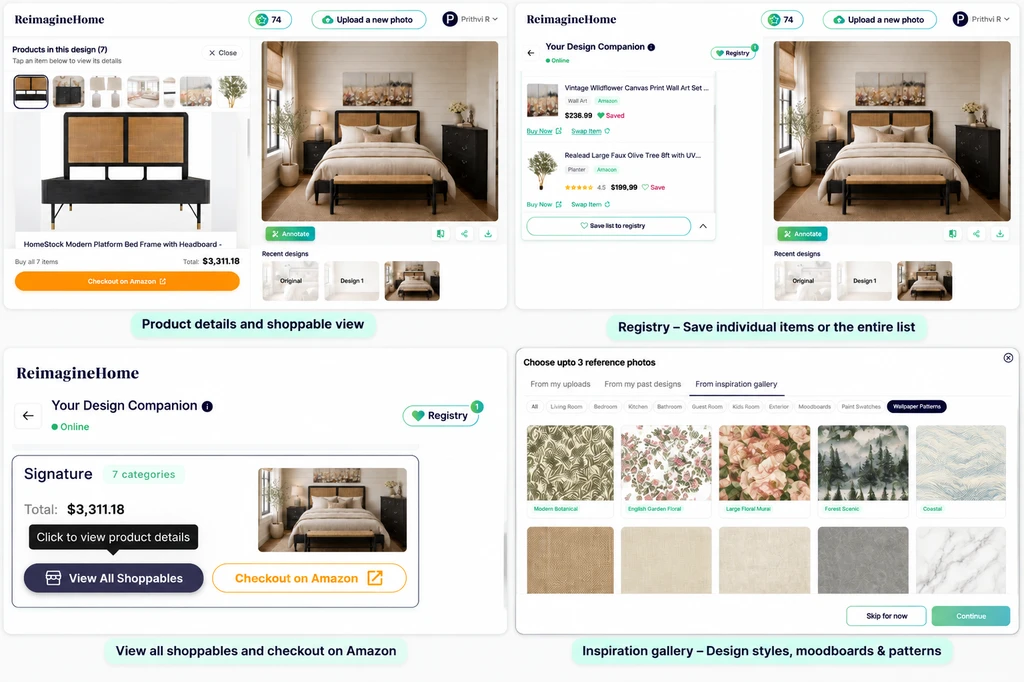
The newest ReimagineHome AI updates streamline the entire home design journey—helping you discover inspiration, generate AI-powered concepts faster, organize your favorite shoppable products, and move from ideas to real, actionable plans for creating your dream space.
A Smarter Way to Turn Room Ideas Into Reality
Envisioning your dream space is only half the journey. Turning inspiration into a functional, beautiful room requires finding the right products, comparing options, and ensuring every piece fits your style and budget. Even with AI-generated designs, there’s often a gap between seeing a gorgeous result and knowing how to bring it to life.
The latest updates to ReimagineHome AI bridge this gap by offering a seamless way to explore styles, visualize designs with precision, organize favorite products, and plan every detail of your home — all from your actual room photo. With these new feature updates, users can now discover inspiration, create designs faster, save products, and move from ideas to action more confidently. Here’s how these innovations empower smarter and more confident decision-making.
-
Save Your Favorite Products With Registry
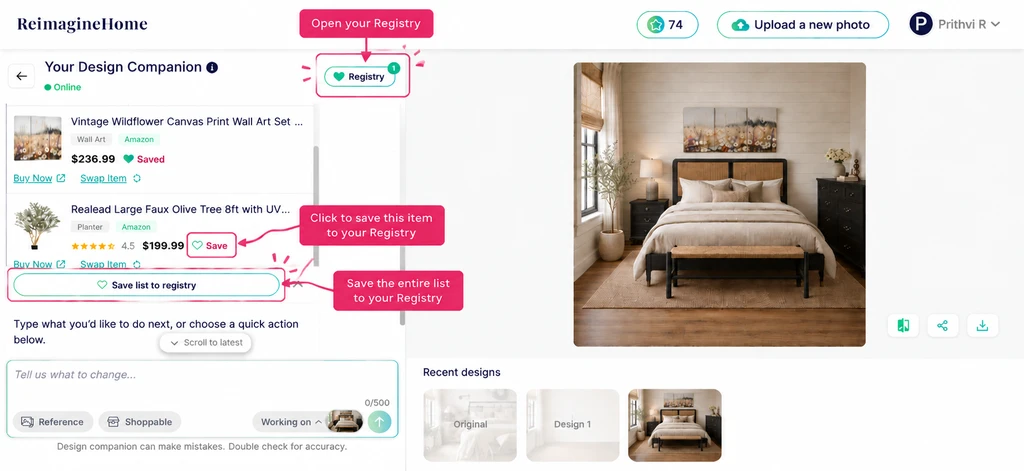
Save individual items or the entire product list to Registry to organize furniture and decor selections from your AI-designed space.
Designing a room is rarely a one-and-done process. Inspiration evolves, ideas shift, and discovering furniture or décor you love is an ongoing journey. The new Registry feature in ReimagineHome helps users capture and organize products as they experiment with various AI redesigns.
- Save real products directly from your AI-generated designs
- Organize furniture and décor to compare, revisit, and plan purchases
This approach simplifies the step from inspiration to action, making it easy to keep track as you browse, visualize, and refine your room. Our guide on simplifying room design with ReimagineHome covers how Registry centralizes everything you love in one convenient place.
-
Explore Every Furniture and Decor Item in Your Design
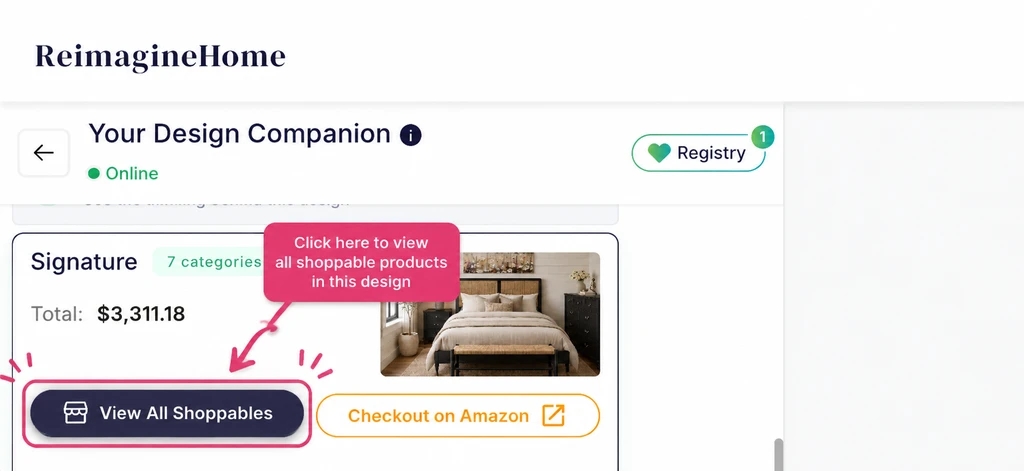
View shoppable products directly from your AI-generated design and explore product details before bringing your space to life.
Turning a design idea into reality becomes easier when you know exactly which products are part of the space. With the latest ReimagineHome update, users can now view all shoppable products included in their AI-generated design and explore detailed information for each item.
- Browse all furniture and decor items used in your design
- View individual product details, images, pricing, and retailer information
- Explore the complete product list while keeping the design context
- Purchase multiple items together through the available checkout option
This makes it easier to move from visual inspiration to actual products, helping users understand what they need to recreate the look they love. As explored in our post on connecting inspiration to real products, connecting designs with real products helps simplify the decision-making process.
-
Discover Your Style With the Inspiration Gallery
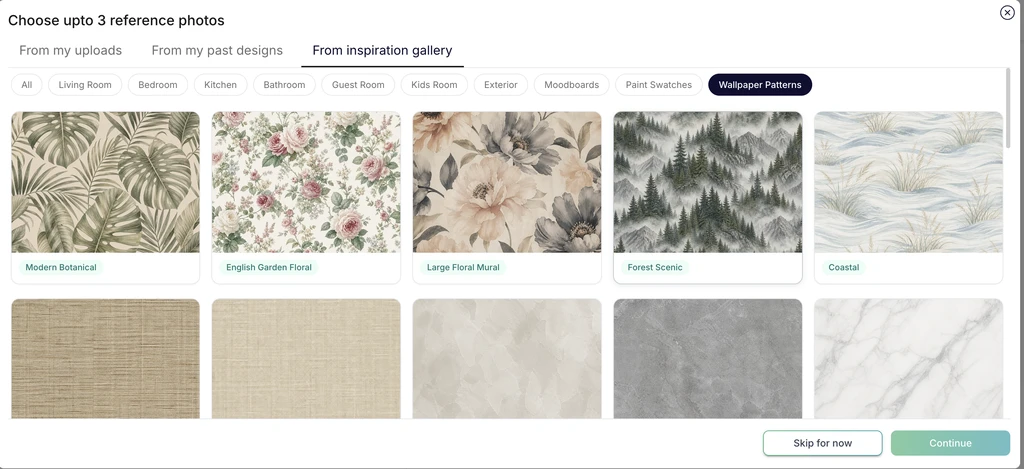
Explore curated inspiration images, styles, and design references to guide your AI-powered room transformations.
Not sure where to start? The new Inspiration Gallery makes it easy to explore curated room ideas, styles, and aesthetics. Browse bedroom sanctuaries, modern living spaces, minimalist offices, and more before uploading your own photo.
- Get exposure to a wide range of interior design genres
- Pinpoint color schemes, layouts, or moods that resonate
- Jumpstart your creativity and set a clear design direction
This gallery bridges the gap between imagining possibilities and defining your taste, a key step highlighted in our breakdown on bridging inspiration and real products.
-
Faster AI Design Generation, More Iteration Power
Testing design ideas is crucial before finalizing any space. The latest improvements to ReimagineHome AI make this faster than ever—allowing you to:
- Compare multiple design directions in minutes
- Refine layouts, colors, and product combinations step by step
- Iterate quickly, adjusting details based on real-world constraints
Rapid generation speeds up the entire design journey. The result? More confidence in your choices and the freedom to experiment until you discover the best version of your room.
-
From Inspiration to Real, Personalized Design—A ReimagineHome Workflow Example
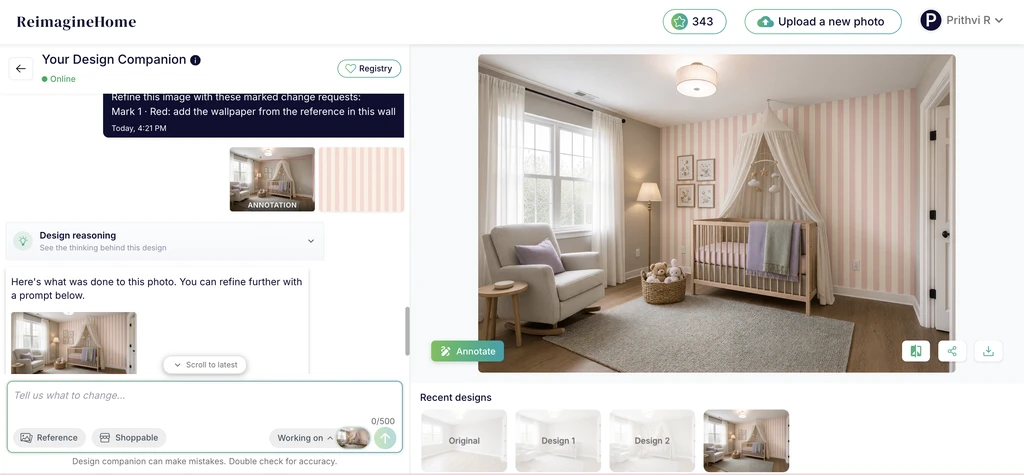
Refine AI designs using annotations and reference images to make targeted changes while keeping the room context intact.
Here's how the latest updates transform the design-to-purchase workflow:
- Upload your real room photo. Start with an image of your existing space to create designs based on your actual room.
- Explore inspiration and define your vision. Browse inspiration galleries, color palettes, wallpapers, moodboards, and design styles to find ideas that match your preferences.
- Generate AI-powered designs. Create photorealistic designs based on your room, selected inspirations, and preferred style direction.
- Make your design shoppable. Transform your generated design into a shoppable space by finding similar real products based on your style, budget, and location.
- View and explore products. Browse the furniture and decor items included in your design, along with product details and purchasing information.
- Save favorites and complete your purchase. Save products you love to your Registry, organize your selections, and checkout when you are ready.
This connected workflow brings together inspiration, design, shopping, and planning in one experience. From exploring ideas to selecting real products, ReimagineHome helps users make more confident decisions and create spaces that work in real life. You can explore a real example of this workflow in our shoppable bedroom staging guide.
Frequently Asked Questions
- How does the Registry help with organizing products?
- The Registry lets you save and organize products discovered through ReimagineHome designs, making it easier to keep track of favorites, compare options, and plan purchases for your space.
- Can I buy the products shown in my AI room design?
- Yes. ReimagineHome connects your designs with real shoppable products. You can view product details, pricing, and retailer information to continue toward purchase.
- What is the benefit of the Inspiration Gallery?
- The Inspiration Gallery helps you explore different styles, color palettes, and design directions so you can discover ideas and define the look you want for your space.
- How is ReimagineHome different from other AI design tools?
- ReimagineHome works with your actual room photo, allowing you to visualize designs based on your existing space, refine ideas step by step, and connect designs with real products. Read more about what sets ReimagineHome apart.
- Can I change just one piece of furniture in my design?
- Yes. You can refine specific elements of your design, such as replacing a rug, changing a chair, or updating a nightstand, while keeping the rest of the room unchanged.
From Inspiration to Reality: Designing Spaces With ReimagineHome AI
The latest ReimagineHome AI updates bring every stage of the interior design journey together in one seamless experience. From discovering inspiration and creating personalized designs to saving favorite products with Registry, exploring shoppable items, and iterating faster with AI, users can move from ideas to action with greater confidence. Designing your dream space is no longer about disconnected steps or guesswork — it is about turning inspiration into a realistic, achievable design plan.