How to See Furniture in Your Room Before You Buy It
TL;DR
Reimaginehomallows you to preview how real furniture looks in your own space before you buy, reducing guesswork and regret. Learn how this changes the shopping experience, the value it adds, how it works, key constraints and trade-offs, and why it redefines how you make furnishing decisions.
Introduction
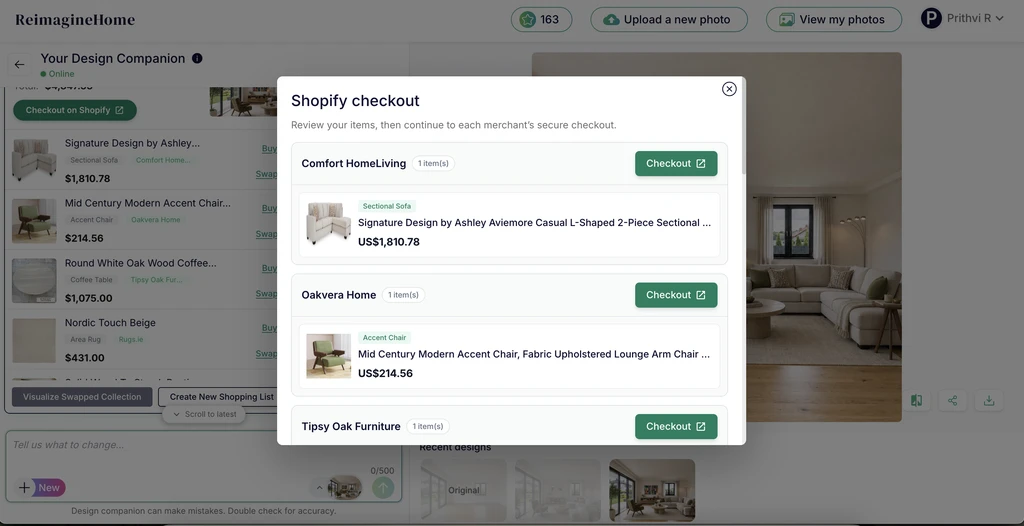
ReimagineHome makes it easier to turn an inspired space into a shoppable one. When products come from different merchants, shoppers can review their items and continue directly to each merchant’s secure checkout.
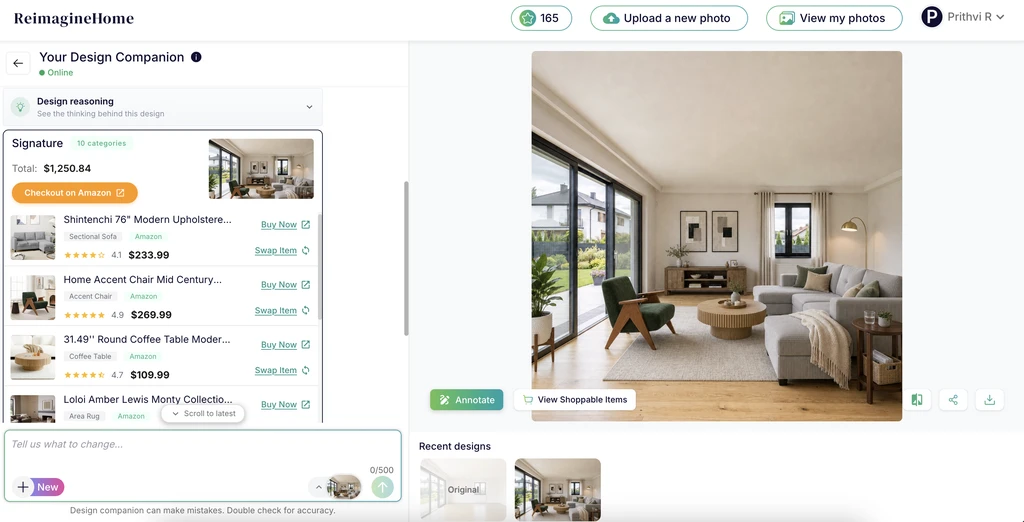
See how furniture will look in your home before you buy it with ReimagineHome. Upload a photo of your room, visualize real furniture and décor in your space, and explore different products to find what works best for your home. Once you find a design you love, you can explore the products used in the room, select the pieces you want, add them to the applicable retail cart, and continue to checkout. With ReimagineHome, the journey can go from visualizing your space to shopping for it in one simple experience.
-
Understanding Real Shoppable Product - Retail checkout
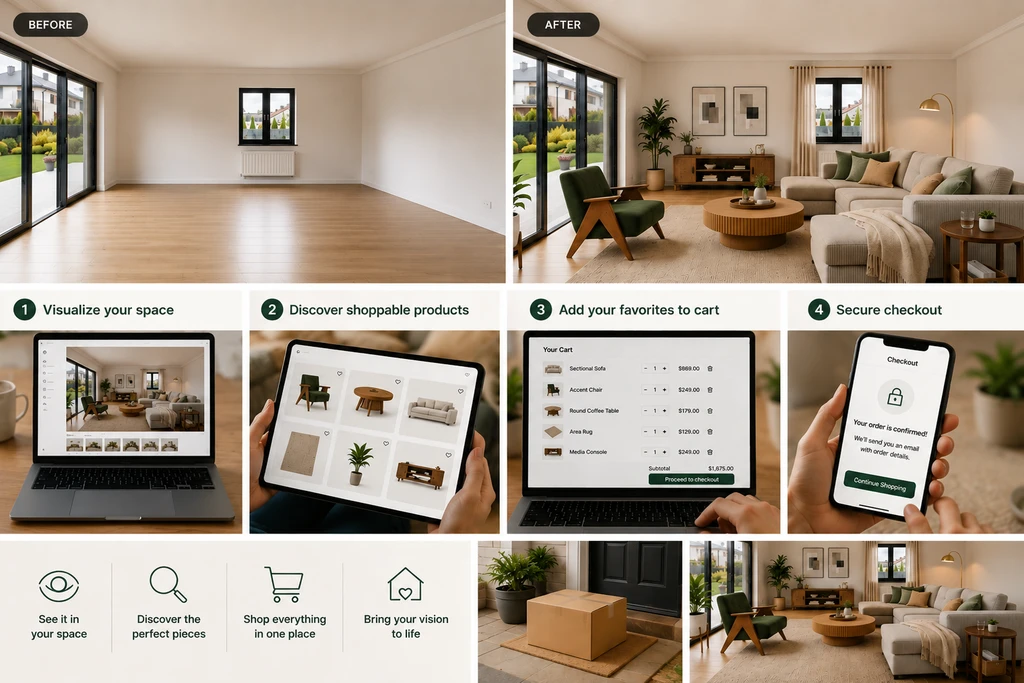
With ReimagineHome AI Visualizer, shoppers can see products in their own space, discover pieces they love, add them to their cart, and move seamlessly toward checkout.
With ReimagineHome, you can upload a room photo, choose from real products, and see how different pieces look together in your space. You can explore different furniture, compare options, and get a better idea of how everything fits before making a decision. Once you find products you love, you can also explore those items and move from your design to shopping. As we explored in our article on real-product staging and shoppable bundles, this makes it easier to connect the room you imagine with products you can actually shop.
-
Key Benefits: From Clarity to Shopping Efficiency
ReimagineHome makes the journey from designing a room to shopping for it more convenient. Once you have created a look you like, you can easily identify the products used in the design and decide which ones you want to purchase. The biggest advantage is that shopping does not have to start from scratch. Select the products you want, add them to the applicable retail cart, and continue to checkout. For products available through Amazon, you can continue to Amazon to complete your purchase. This brings inspiration, product discovery, and retail checkout together, making it easier to turn a room you love into a room you can actually create.
-
What to Keep in Mind
Room visualization can make furniture shopping easier, but it is still a visual guide rather than a replacement for checking the product details. The final look can vary depending on the room photo, lighting, and how the product appears in the space. It’s always a good idea to check the product’s measurements, materials, color, and other details before purchasing. You should also review the retailer’s product information and return policy before completing checkout. ReimagineHome helps you see how products could work in your space, while the final purchase decision remains yours.
-
Connecting Design to Retail: Closing the Loop
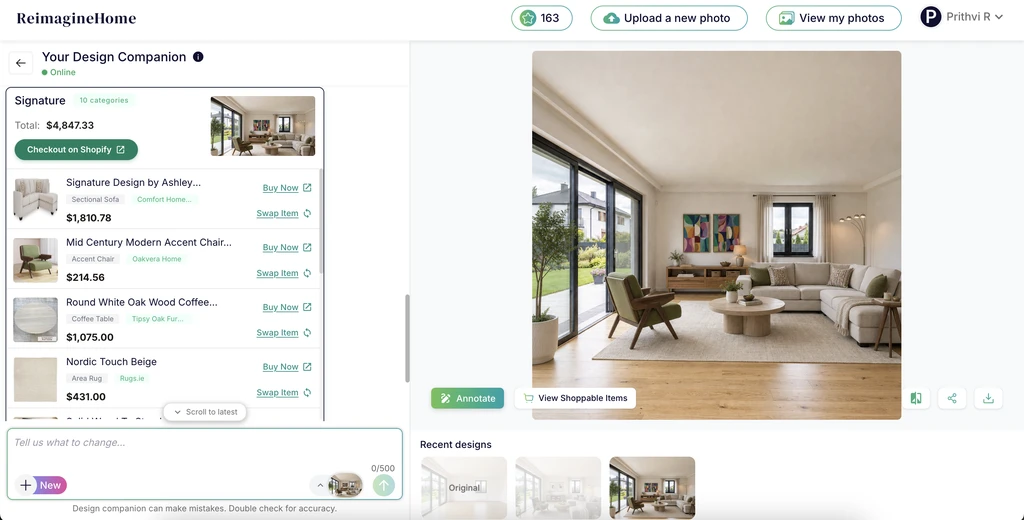
ReimagineHome turns your room into a shoppable design. Explore the products used in your space, compare options, swap pieces you want to change, and shop directly from the design.
A great room design shouldn't have to end with inspiration. Once you find a look you love, you can explore the products featured in the design and choose the pieces you want to bring into your space. Selected products can be added to the applicable retail cart, making it easy to move from your design to checkout. Depending on the product, you can continue to Amazon or Shopify to complete your purchase. This creates a simple journey from inspiration → visualization → product discovery → cart → purchase, without having to search for every item all over again. Platforms like REimagineHome exemplify this workflow: you see real furnishings in your own room, identify and select products, and go directly to retailer checkout, ensuring a true match between vision and reality. This minimizes regret and supports actionable, confident decisions.
Room Visualization FAQ
Does room visualization guarantee that the furniture will look exactly the same in real life?
While highly accurate for layout, color, and scale, visualization can’t fully represent textures, comfort, or changing light. Physical trials remain important for final decisions where possible.
What kind of photos work best for accurate room staging?
Well-lit, clutter-free images taken from natural sight-lines provide the best basis for digital visualization.
Can I visualize multiple products and combinations at once?
Yes, ReimagineHome allows you to test furniture groupings, layouts, and style blends within a single session before commitment.
How does this reduce the chance of buyer’s remorse?
By eliminating scale, style, and placement guesswork, visualization increases decision confidence and minimizes costly mistakes.
Is this method only for full-room redesigns?
No, targeted updates—like sofas, rugs, or accents—can also benefit from pre-purchase visualization.